
Google has released the first beta of Android 17, marking a continuation of its efforts to enhance platform privacy, security, and performance. This release introduces significant changes to how applications handle large screens, updates the developer release timeline, and provides new tools for camera and media optimization.
A Shift in Release Strategy: Canary Channel
A notable change in the Android 17 lifecycle is the transition from the traditional “Developer Preview” model to a continuous “Android Canary” program. This always-on model is designed to streamline the feedback loop between Google and the developer community.
The Canary channel offers three primary distinctions from the previous model:
- Faster Access: Features and APIs are released to Canary immediately following internal testing, removing the wait for quarterly milestones.
- Stability: Early testing in Canary is intended to produce a more polished beta experience, with APIs and behaviors closer to their final state.
- Integration: Canary supports Over-the-Air (OTA) updates, eliminating the need for manual flashing. As a separate update channel, it integrates more easily with Continuous Integration (CI) workflows.
The Android 17 Schedule
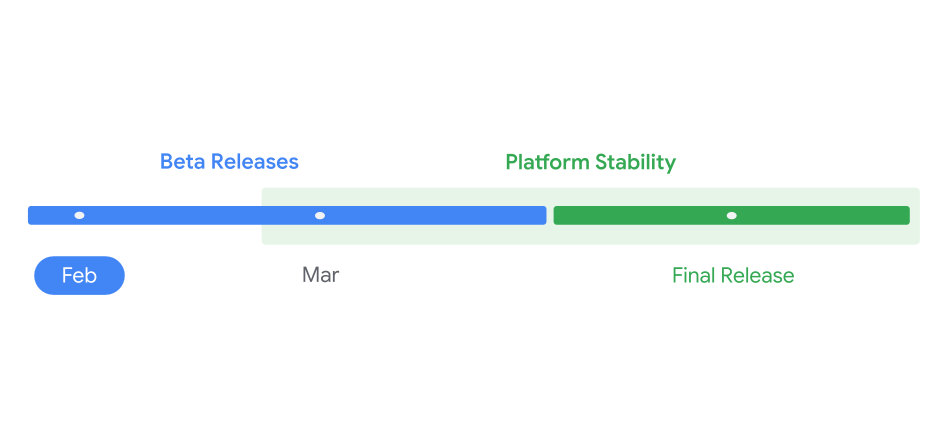
Following this beta this February, the timeline targets a “Platform Stability” milestone in March. At this stage, SDK/NDK APIs and app-facing behaviors will be finalized, leaving developers several months for testing before the final release sometime in Q3 2026.
Adaptive UI: Mandatory Resizability for Large Screens
With Android 17 (API level 37), Google is enforcing stricter requirements for app behavior on large screen devices (defined as having a smallest width ≥ 600dp).
Previously, developers could opt out of certain orientation and resizability restrictions. Targeting SDK 37 removes this opt-out. Apps running on tablets, foldables, or desktop windowing environments must now support landscape and portrait layouts and adapt to resizable windows.
Key constraints for API 37:
- Mandatory Adaptation: The system will ignore manifest attributes and runtime APIs that restrict orientation or aspect ratio on screens sw > 600dp.
- Exemptions: These changes do not apply to traditional phones (screens smaller than sw 600dp) or apps explicitly categorized as games via the android:appCategory flag.
- User Override: Users retain the ability to force an app’s behavior via system aspect ratio settings.
Performance and Runtime Optimizations
Android 17 introduces several low-level changes aimed at improving app efficiency and system health.
- Lock-free MessageQueue: Apps targeting SDK 37+ will use a new, lock-free implementation of android.os.MessageQueue. This aims to reduce missed frames, though it may break apps that rely on reflection to access private MessageQueue fields.
- Generational Garbage Collection: The Android Runtime (ART) now utilizes generational garbage collection within the Concurrent Mark-Compact collector. This allows for frequent, low-cost collections of the “young generation” of objects, reducing the CPU cost and duration of full-heap collections.
- Strict “Static Final” Fields: Modifying static final fields via reflection or JNI will now result in exceptions or crashes. This restriction allows the runtime to apply more aggressive performance optimizations.
- Profiling Triggers: The ProfilingManager now supports new system triggers—including Cold Start, Out of Memory (OOM), and Excessive CPU Usage—to assist in debugging.
Media and Camera Capabilities
The update brings professional-grade features to media and camera applications, aiming to standardize quality and reduce implementation complexity.
- Dynamic Camera Sessions: The new updateOutputConfigurations() method in CameraCaptureSession allows apps to attach or detach output surfaces dynamically. This enables seamless transitions between modes (e.g., photo to video) without the latency of reconfiguring the entire session.
- Logical Multi-Camera Metadata: Developers can now access metadata from all active physical cameras in a logical camera group using the LOGICAL_MULTI_CAMERA_ADDITIONAL_RESULTS key.
- Versatile Video Coding (VVC): Android 17 adds platform support for the VVC standard, including MediaCodec and MediaExtractor integration for devices with supported hardware.
- Constant Quality Recording: A new setVideoEncodingQuality() method in MediaRecorder allows for Constant Quality (CQ) configuration, offering control beyond standard bitrate settings.
Privacy, Security, and Connectivity
Updates in connectivity and security focus on user transparency and modernized protocols.
- Background Audio Hardening: The audio framework will now silently fail or reject audio focus requests if an app attempts to initiate playback or volume changes while not in a valid lifecycle state.
- Cleartext Traffic Deprecation: The android:usesCleartextTraffic attribute is deprecated. Apps targeting Android 17 without a specific Network Security Configuration will default to disallowing cleartext traffic.
- VoIP and Wi-Fi: New features include enhanced VoIP call history (supporting avatars and privacy controls) and Wi-Fi Ranging updates (Proximity Detection and 11az secure ranging).
- Companion Devices: Two new profiles, Medical Devices and Fitness Trackers, have been added to CompanionDeviceManager to streamline permission handling and device identification.
Getting Started
You can access Android 17 Beta 1 by enrolling a supported Pixel device (Pixel 6 series and later) in the Beta program or using 64-bit system images with the Android Emulator (configured to targetSdkPreview = “CinnamonBun”).
Google encourages developers to compile against the new SDK and test specifically for the new large-screen adaptation requirements, as the window for feedback narrows, approaching the Platform Stability milestone in March.