
Skip to content
Fone Arena

Fone Arena

The Mobile Blog

  • Main Site
  • Phones
  • Gadgets
  • About
  • Media Coverage
  • Advertising
  • Contact
  • Tip Us
  • Twitter
  • FB
  • Youtube

WhatsApp rolls out Parent-managed accounts for pre-teens


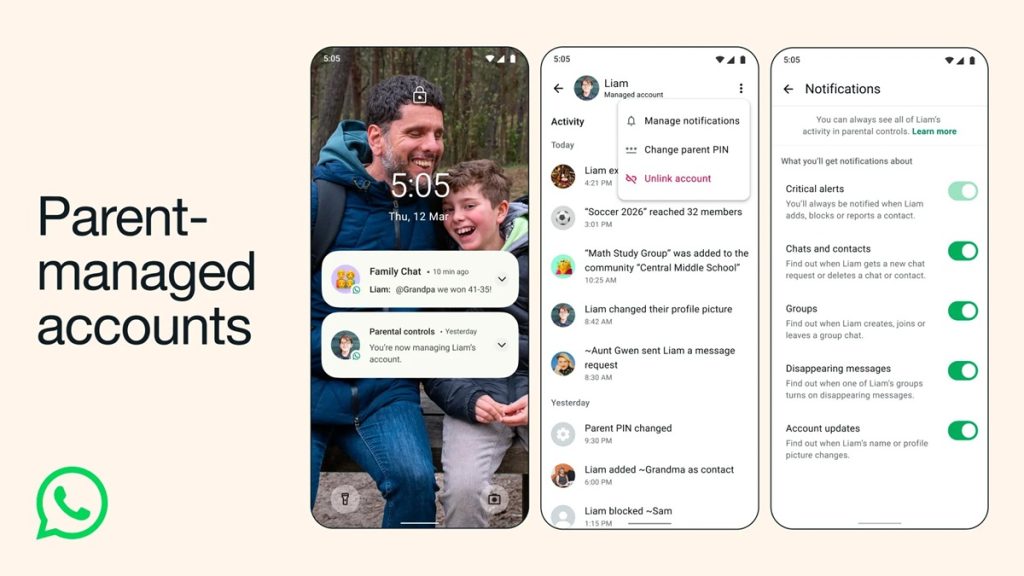
WhatsApp has started rolling out parent-managed accounts to help families use the messaging platform safely for children under 13 (or the local minimum age). These accounts allow parents or guardians to control their child’s WhatsApp experience while keeping personal conversations private and encrypted.

Key Features: Parent-managed accounts
  • Parental control: Parents can manage who their child contacts, which groups they can join, and review message requests from unknown users.
  • Privacy protection: All chats remain end-to-end encrypted, ensuring that neither WhatsApp nor third parties can access conversations.
  • Parent PIN: A 6-digit PIN restricts access to account settings, giving only parents the ability to adjust privacy or communication permissions.
  • Limited functionality: Child accounts are restricted to messaging and calling only.
  • Gradual rollout: The feature is being introduced in stages and may not yet be available in all regions.

These features let parents safely oversee their child’s messaging activity, control contacts and group participation, and ensure personal conversations remain private, while still allowing pre-teens to stay connected with family and friends.

Setting Up a Parent-Managed Account

Requirements:

  • Parent or guardian 18+
  • Latest version of WhatsApp installed on both parent and child devices

Steps:

  1. Download and install WhatsApp on your child’s phone from Google Play Store or Apple App Store.
  2. Open WhatsApp on the child’s device and select More options → Create a parent-managed account.
  3. Enter your child’s phone number and birthday to confirm their age.
  4. On your device, open WhatsApp and scan the QR code displayed on your child’s phone.
  5. Verify that you are an adult on your device.
  6. Create a 6-digit parent PIN to control your child’s privacy settings.
  7. On your child’s device, enter the parent PIN to complete setup.
  8. Let your child add their name and profile photo.

Note: Depending on local regulations, app stores may share your child’s age range with WhatsApp. You can check or adjust this in Apple or Google device settings.

Availability

Parent-managed accounts are rolling out gradually. Availability may vary by region and local regulations.

Author Tamil GPosted on March 12, 2026Categories apps, News, WhatsAppTags child privacy, kids safety, parent PIN, parental controls, whatsapp, WhatsApp family safety, WhatsApp for pre-teens, WhatsApp parent-managed account setup, WhatsApp parent-managed accounts, WhatsApp Privacy Settings

Post navigation

Previous Previous post: Microsoft introduces new PIX and DirectX tools for PC developers at GDC 2026

Trending Phones

  • OnePlus 6
  • Xiaomi Mi 8
  • Honor 10
  • Samsung Galaxy S9
  • Apple iPhone X
  • Nokia 7 Plus

Mobile Phones

  • Nokia
  • Sony Ericsson
  • Samsung
  • Motorola
  • i-Mate
  • Dopod
  • HTC
  • LG
  • 02
  • BlackBerry
  • Sagem
  • Haier
  • palmOne
  • HP
  • Spice
  • Fly
  • Apple

Latest Phones

  • Oppo Find X
  • Xiaomi Redmi 6 Pro
  • vivo NEX S
  • Nokia X6
  • Blackberry KEY2
  • Motorola Moto G6

Featured Video

Recent Posts

  • WhatsApp rolls out Parent-managed accounts for pre-teens
  • Microsoft introduces new PIX and DirectX tools for PC developers at GDC 2026
  • Apple’s foldable iPhone could feature iPad-like interface
  • Tata Play Binge now available on VIDAA-powered Hisense, Toshiba, and partner Smart TVs
  • Xbox unveils Project Helix next-gen console with AMD SoC and DirectX support
  • Samsung Galaxy S26 Ultra Unboxing and First Impressions
  • vivo Y51 Pro 5G with 6.75″ 120Hz display, Dimensity 7360 Turbo, 7200mAh battery launched in India starting at Rs. 24,999
  • Zoom expands enterprise agentic AI platform with AI Companion 3.0 and workflow orchestration
  • Sonos Play and Sonos Era 100 SL speakers announced
  • U&i Entry Star 100 (UiSW 7596) with 2.2″ display, interchangeable straps launched

Popular stories

  • Netflix Plans
  • Airtel 5G phones
  • Jio 5G phones
  • Jio Recharge Plans
  • Airtel USSD codes

Categories

Latest phones

  • Lenovo Phab 2
  • Lenovo Phab 2 Plus
  • Lenovo Phab 2 Pro
  • Motorola Moto Z
  • Motorola Moto Z Force
  • Reliance Lyf Wind 5
  • Main Site
  • Phones
  • Gadgets
  • About
  • Media Coverage
  • Advertising
  • Contact
  • Tip Us
  • Twitter
  • FB
  • Youtube
© FoneArena - 2005-2026