

HUAWEI has officially launched HarmonyOS 6 in its home market, China, introducing a more refined user interface, improved performance, and deeper AI integration across its ecosystem. Notably, the company has removed the “NEXT” suffix from the OS’s moniker, which was used in the previous version.
HarmonyOS 6
The latest system update enhances personalization, responsiveness, and cross-device integration throughout the Harmony ecosystem.
New Visual Design and Interface
HarmonyOS 6 introduces a refined visual experience with responsive animations and a dynamic light-sensing system that adapts naturally during tasks such as voice assistant activation, photo editing, and privacy interactions. The result is a seamless and consistent interface across everyday scenarios.
The lock screen gains new AIGC-based signature customization, generating artistic designs by analyzing font characteristics and blending text with visuals. Smart composition automatically adjusts depth, layout, and color based on user photos to create distinctive wallpapers.
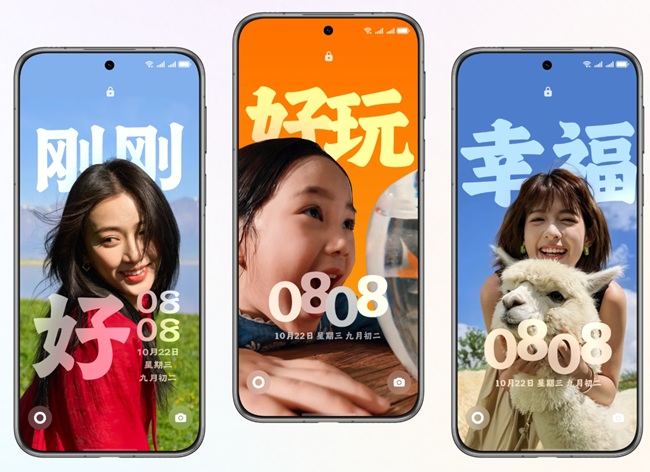
- Mood-based themes respond to user sentiment with matching captions and emojis, allowing switching through tap or long-press gestures. These themes can also be shared between devices to reveal hidden variants.
- The “Fuzzy Ball” theme integrates AIGC for signature customization, mood response, and voice-triggered visual effects via Xiaoyi, adding dynamic animations each time the screen lights up.
System Performance and Cross-Device Experience
Powered by the Ark Engine, HarmonyOS 6 achieves smoother responsiveness and faster operations across devices. Multi-device performance is improved by 15% compared to HarmonyOS 5 and up to 40% over HarmonyOS 4, with battery life extended by 35 to 51 minutes, based on lab tests.
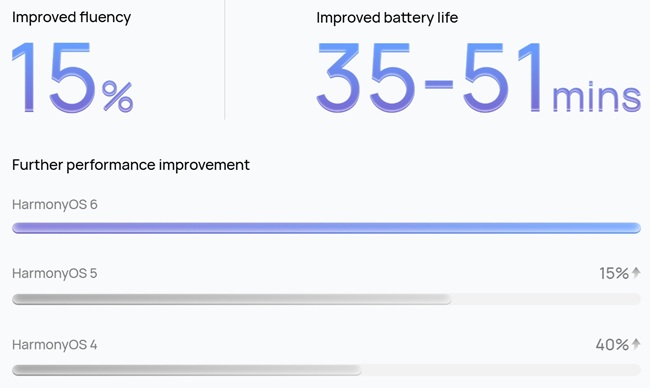
Performance improvements include:
- 11% faster app startup
- 21% quicker page rendering
- 30% faster content loading
Large PDF files now open in just 0.6 seconds, compared to 55 seconds on Windows 11 during internal testing, the company highlighted.
The new tap-to-share feature supports over 60 apps, enabling instant transfer of photos, files, and links across devices. Cross-device workflows now support two-way sharing between mobile and PC, while gaze-based drag-and-drop lets users move items simply by looking at the target device and pressing Ctrl—boosting productivity by 27%.
- System-level coordination with DJI Osmo handheld gimbals enables intelligent subject tracking for vlogs, livestreams, and video calls.
- Live Windows display travel and schedule updates, while multi-scene recognition improves document scanning accuracy even under glare or low light.
AI-Powered Creativity and Media Tools
Camera tools now feature
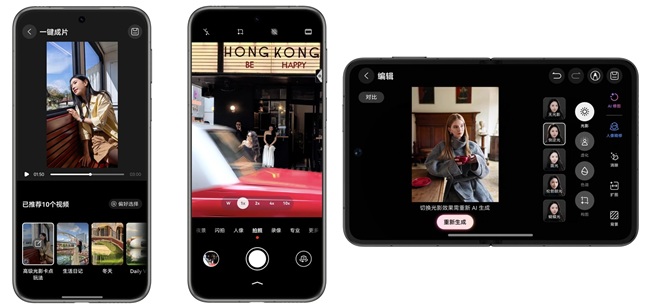
- Scene-aware Portrait Retouching, automatically refining lighting, blur, and depth-of-field with one tap.
- A Personalized Color Card lets users define preferred tones for consistent visuals across photos.
- AI One-Click Filming converts still photos into short animated clips using dynamic effects, turning static moments into visual stories.
Smarter AI Assistant: Xiaoyi
The upgraded Xiaoyi assistant can perform multi-step tasks autonomously with a single command and now supports dialect-based voice interactions for more natural communication.
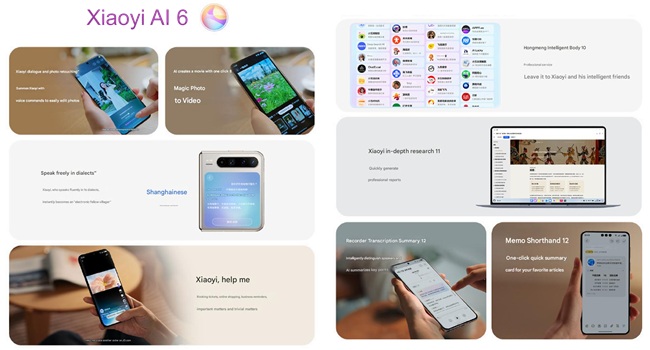
Key additions include:
- Smart Categorization – Automatically groups files by type, name, or date.
- Memo Quick Capture – Saves links and generates summary cards without switching apps.
- Recorder Transcription Summary – Differentiates speakers and produces concise summaries.
- Deep Research on PC – Combines online data with uploaded files to provide contextual insights through dialogue.
AI Health Assistant and Everyday Tools
The new AI Health Assistant, accessible via Xiaoyi, supports voice-based medical consultations, hospital navigation, appointment scheduling, and insurance code access.
Through iFLYTEK Xiaoyi integration, the assistant can interpret medical reports, translating complex terminology and indicator changes into simpler guidance.
Additional AI-powered tools include:
- Fan Tracker for event and ticket information.
- Smart Viewing for personalized watchlists and highlight summaries.
- Music Assistant for mood- or scene-based playlists.
- News Companion for AI-generated summaries and recommendations.
- Reading Companion for plot Q&A and story organization.
- Weather Insights with forecasts and outfit suggestions.
Privacy and Security Upgrades
HarmonyOS 6 debuts the StarShield Security Architecture, a system-wide upgrade from kernel to app ecosystem. It applies AI-driven protection and enforces user-controlled data access.
Key privacy features include:
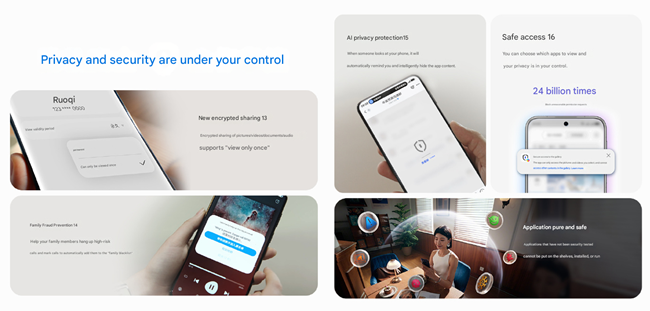
- Family Anti-Fraud, alerting users to suspicious calls, allowing remote termination, and syncing flagged numbers across devices.
- AI Anti-Fraud Protection, detecting scams such as AI face-swap attempts during video calls.
- Anti-Peek Protection, automatically hiding sensitive content when others view the screen.
- Encrypted Sharing, restricting access to approved recipients and blocking screenshots or recordings.
- View-Once Mode, allowing one-time content viewing to prevent secondary sharing.
The HarmonyOS Personal Intelligent Computing (HPIC) framework extends device-level privacy protections to cloud-based AI processing, ensuring user data is neither stored nor misused.
Accessibility and Family Controls
HarmonyOS 6 includes AI visual assistance for real-time perception and navigation support. Smart usage management helps children maintain healthy screen habits with time controls and eye-protection mode, while remote monitoring enables families to check device location and status of senior users for added safety.
Availability and Rollout
The HarmonyOS 6 public beta began on October 22, 2025, initially for devices sold in mainland China. A broader rollout will follow according to HUAWEI’s official schedule. Devices in Hong Kong, Macao, and Taiwan are not included in this phase.
October 2025 – Public Beta
- Huawei Mate 70, Mate 60, Mate X6, Mate X5 Series
- Huawei Pura 80, Pura 70, Pura X Series
- Huawei Pocket 2 Series
- Huawei Nova 14, Nova 13, Nova 12, Nova Flip, Nova Flip S
- Huawei MatePad Pro 13.2 (2025 & 2023), MatePad Pro 12.2 (2024), MatePad 11 Pro (2024)
Closed Beta
- Huawei Mate XT & XTs Ultimate Design
- Huawei MateBook Fold PC Ultimate Design
- Huawei MatePad Pro 12.2 (2025)
- Huawei MateBook Pro
- Huawei Watch 5 & GT 5 Series
- Huawei FreeBuds 6, FreeBuds 7i, FreeArc
November–December 2025
- Huawei Nova 14 Lite (Vitality Edition)
- Huawei Enjoy 70X
- Huawei MatePad Mini, MatePad Air (2024 & 2025)
- Huawei MatePad 11.5S (2024 & 2025)
- Huawei Watch Fit 4 Series
- Huawei FreeBuds Pro 4, FreeClip 2, FreeClip
IoT Products
- Huawei Smart Mate TV Series, Smart Home X2 Pro
- Huawei Router X1 Series, Lingxi Router Q7
- Huawei Smart Door Lock 2 Series
- Huawei Sound X4, Sound X Gilded Theater Edition, Sound X New, Sound X 2021