
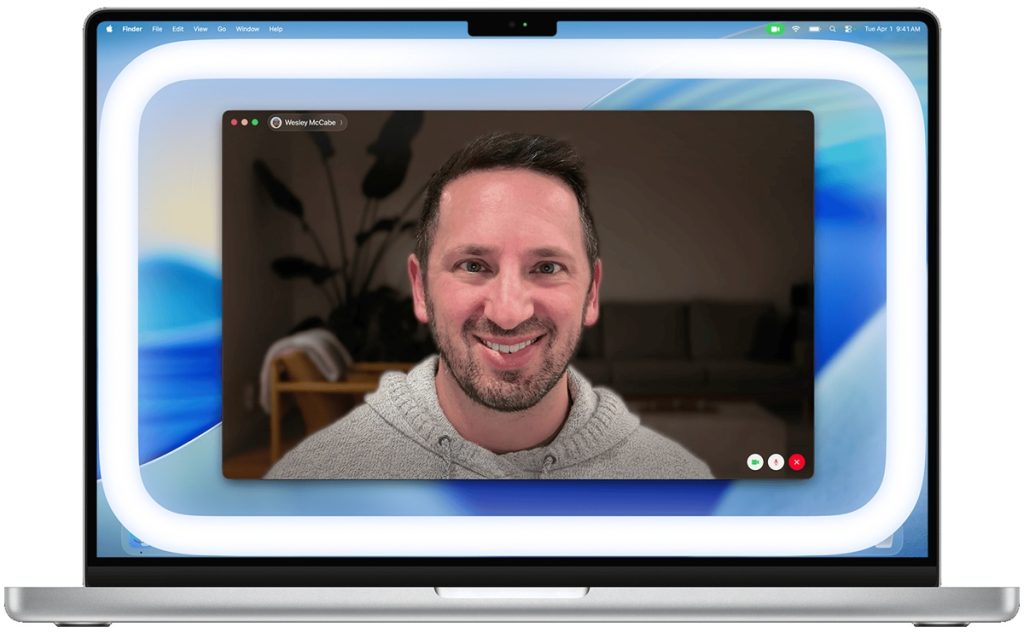
Apple has released macOS 26.2, introducing Edge Light, a built-in video effect aimed at improving face lighting during video calls in low-light environments. The feature uses the Mac’s display to create a soft fill light around the edges of the screen, similar to a virtual ring light.
What is Edge Light?
Edge Light illuminates the borders of the Mac’s display to provide even lighting on the user’s face during video calls. The effect automatically recedes near the mouse pointer so on-screen content remains accessible. It works across video conferencing apps and can be used alongside other macOS video effects.
How Edge Light works and how to use it?
Edge Light is designed for low-light conditions, such as dim indoor environments. During an active video call, users can turn the feature on or off from the Video menu in the menu bar by selecting Edge Light.
Display behavior depends on the camera in use:
- When using the built-in camera, the effect appears on the built-in display
- When using Continuity Camera or an external camera, the effect appears on the primary display, which is the display assigned the menu bar in Displays settings on multi-display setups
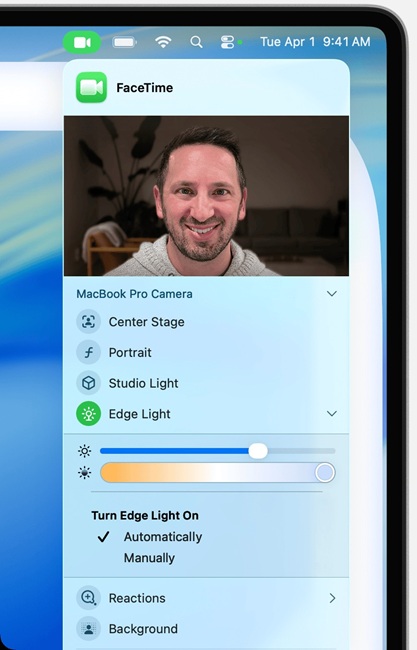
The feature is powered by Apple Silicon. The Neural Engine detects faces, their relative size, and position within the camera feed, while the Image Signal Processor precisely measures ambient light levels to adjust brightness automatically. The lighting dynamically adapts to the scene and recedes near the mouse pointer to avoid obstructing content.
Edge Light controls
When Edge Light is enabled, additional controls are available:
- Brightness adjustment, which changes illumination by altering the width of the light effect
- Color temperature control, allowing users to select warmer or cooler lighting tones
- Automatic activation option, which enables Edge Light to turn on automatically when a video call starts in low-light conditions
Edge Light joins existing built-in macOS video conferencing features, including Studio Light, Portrait mode, virtual backgrounds, and Voice Isolation. These effects work system-wide across supported video calling apps.
Availability
Edge Light is available on Mac models with Apple silicon running macOS Tahoe 26.2 or later. The option to automatically enable Edge Light in low-light conditions is limited to Mac models introduced in 2024 or later.
The feature supports the built-in camera, Continuity Camera, and external cameras, is currently available in the beta, and will roll out publicly later this year.