
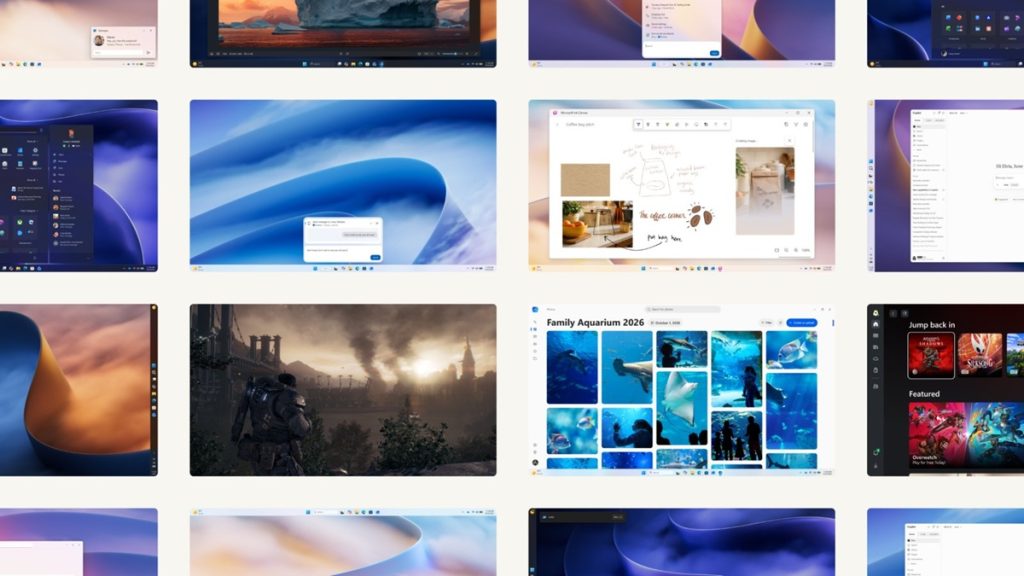
Microsoft is beginning to roll out a set of Windows 11 updates covering system performance, taskbar Search, phone-to-PC integration, photo editing, gaming, creative tools and accessibility. The changes include improvements to memory management, everyday apps, Windows Update and support for advanced haptic feedback.
What’s new in Windows 11
The updates also extend how users interact with Windows through connected phones, pen and touch input, and accessibility tools across Windows and Microsoft 365 apps. Here is a closer look at the changes Microsoft has detailed.
Performance and memory improvements
Microsoft says Windows 11 is up to 20% more responsive, with improvements across the Windows platform, system interface and everyday applications. These changes cover tasks such as starting the PC, opening apps and working with files.
The improvements include:
- Faster everyday tasks: Updates cover startup, Start, File Explorer, Search, Snipping Tool, Microsoft 365 apps and Microsoft Edge.
- Better memory management: On PCs with 8GB of memory, Windows can keep up to 2GB more active data in memory.
- Reduced background memory use: On PCs with 8GB of memory or less, Widgets load only when opened, making more than 200MB of memory available for other tasks.
- More personalization: Users can choose the taskbar’s location and customize Start and the taskbar. Widgets also get a cleaner interface with fewer distractions.
- More control over Windows Update: Users get greater control over update timing, while Windows coordinates updates to reduce restarts and the time needed to apply them.
- Improved Bluetooth and Windows Hello: Bluetooth headphones get improvements to pairing, reconnection, audio and calls, including an AirPods pairing experience that is up to 15 seconds faster. Windows Hello also gets improvements to face and fingerprint recognition.
- Driver reliability: Microsoft’s Driver Quality Initiative focuses on improving driver stability, reliability, security and performance.
Search adds actions to taskbar results
Windows Search is getting an updated interface with clearer results and more control over suggestions. Microsoft says this builds on search quality improvements introduced over recent months, with some actions now available directly from search results.
Users can perform several tasks without opening the relevant app or Settings page:
- Change Dark Mode or Night Light settings.
- Minimize or arrange windows.
- Access connected-phone support, which Microsoft says is planned for a future update.
Phone-to-PC integration
Windows 11 is expanding the phone features available from a PC, bringing messages, notifications, calls, apps and files into the desktop experience. The integration supports Android phones and iPhones, with some features limited to supported Android devices.
The expanded features include:
- Messages and notifications: Preview phone messages and notifications in Start, open a conversation window and reply from the PC.
- Phone calls: Answer calls from the PC instead of switching to the phone.
- Find a misplaced phone: Use Quick Settings to ring or silence the connected phone.
- Separate app windows: On supported Android devices, open phone apps in resizable windows on the PC.
- File access: Browse files stored on a supported Android phone through File Explorer.
- Photo access: Open photos from the phone using a PC notification with one click.
- Resume activities: Continue supported activities from where they were left off.
Microsoft Photos gets a redesigned app
The redesigned Microsoft Photos app brings images from a PC and connected libraries into Gallery, making more of a user’s collection available in one place. It also adds ways to find pictures using natural-language descriptions and group them into albums for sharing.
The changes extend to editing, viewing and sharing photos:
- Faster launch: Microsoft says the Photos app launches up to 20% faster.
- Updated Editor: The Editor loads faster and includes tools for cropping, adjusting colours, removing distracting objects from backgrounds and using Relight.
- Redesigned Viewer: The Viewer has less clutter and more room for pictures.
- Sharing and printing: Options for sharing and printing are accessible from the app.
Gaming features and Xbox anniversary offer
Windows 11 is getting gaming-related updates, including Advanced Shader Delivery (ASD), Game Bar improvements and an Xbox anniversary game collection. ASD delivers precompiled shaders for supported games to reduce initial loading times.
Microsoft says ASD is intended to reduce initial load times from minutes to seconds. The company has named Forza Horizon 6 and Gears of War: E-Day among the games associated with the feature. To get the most from ASD, users should install the Xbox PC app before downloading a supported game and keep their graphics drivers up to date.
Other gaming updates include:
- Game Bar widgets: Open with Win + G to access tools for recording gameplay, connecting with friends and managing audio.
- Microsoft Edge for Game Bar: Access guides, videos and websites in an overlay while playing.
- Xbox anniversary collection: A collection of 25 games worth more than $500, including The Elder Scrolls V: Skyrim Special Edition, Halo: Combat Evolved Anniversary, Age of Empires II: Definitive Edition, Minecraft Dungeons and Gears of War: Reloaded.
Games claimed through the collection are linked to the user’s Microsoft account and can be played on compatible Windows PCs. Select titles are also available on Xbox Series X|S through Xbox Play Anywhere, although some eligible PCs may not be able to run every game.
Ink Canvas and advanced haptics
Ink Canvas supports sketching, annotation and note-taking with a pen or touch input on a flexible canvas. Users can select notes, drawings and references, then use Copilot to help turn them into visual or written content for another document or presentation.
Windows is also adding advanced haptic feedback to provide tactile cues for certain actions. Examples include snapping windows into place, aligning objects in PowerPoint or Affinity by Canva, and snapping clips in Filmora. A library of curated effects links each cue to the corresponding action.
The supported accessories named by Microsoft include Surface Mouse (2nd Edition) and Logitech MX Master 4.
Accessibility improvements
Windows and Microsoft 365 apps are getting additional accessibility features for users who rely on screen reading, magnification, colour adjustments and braille displays. The updates cover both everyday Windows tasks and work in individual applications.
- Screen Tint: Adds a colour overlay with adjustable strength.
- Magnifier: Supports separate zoom levels for each display, allowing users to keep a magnified reference on one screen while working on another. A locked view stays in place, and refreshed contrast themes can be applied with one click while preserving the true colours in photos.
- Narrator and maths: Narrator reads mathematical expressions while preserving their structure, making individual parts easier to follow.
- Outlook: Users can jump directly to a sender or a meeting location.
- Excel: Users can hear row and column headers.
- PowerPoint and web forms: Accessibility improvements support creating and presenting slides, as well as completing forms on the web.
- Braille displays: Narrator supports braille displays that use the HID standard over USB or Bluetooth without requiring additional drivers. Support is available from the initial Windows setup screen, allowing users to set up Windows independently.
Users can find the relevant accessibility options by pressing the Windows logo key + U to open Settings.
Availability
Microsoft says the broader Windows improvements are beginning to roll out, with more updates planned. The new Windows Search experience is currently available to Windows Insiders, with a broader rollout planned for later this year.
- The Xbox anniversary game collection is set to become available this November for eligible Windows 11 PCs purchased in the United States. Once claimed, the games are linked to the user’s Microsoft account, subject to compatibility requirements.
- Ink Canvas comes preinstalled on the Surface Pro 12-inch (2nd Edition). Users with other supported devices can download it from the Microsoft Store.