

With the rise of AI-generated video content, identity theft has been increasing. Google is taking initiatives for the same and experimenting with a feature called “Likeness detection ” with its YouTube platform. Likeness detection helps users to find content where their face may have been altered or generated by AI, and lets them review any detected instances to decide on the appropriate action.
Likeness detection works similarly to Content ID, except that it searches for a person’s likeness rather than copyrighted audio and video content, says Google. For beta testers, a new tab called “Likeness” will appear under the Content Detection menu of YouTube Studio. The new tab will list all possible instances of possible likeness videos, and you shall take appropriate action.
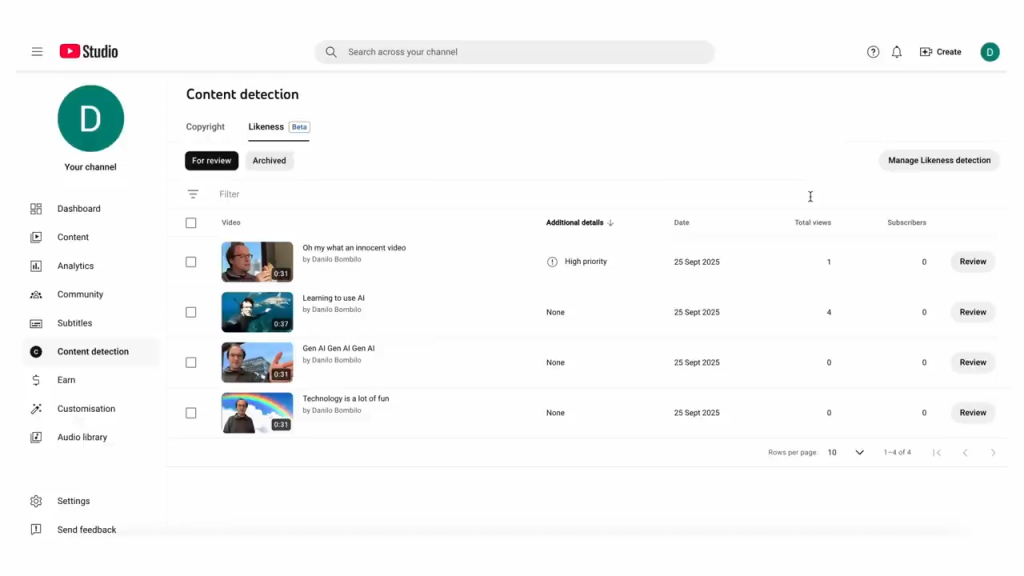
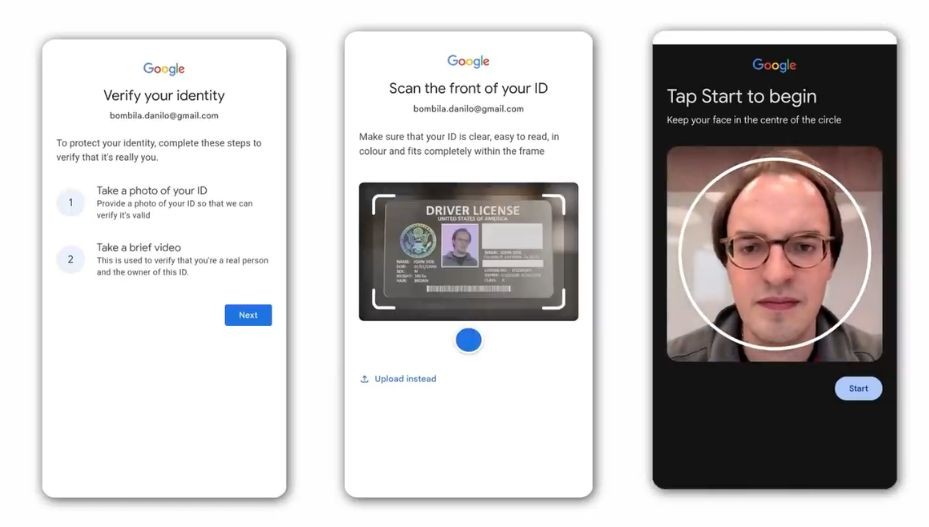
This feature is optional, meaning the owner has the right to turn on or off detection as per their choice. If they want to use it, the person needs to go through the Google identity verification process, which requires a government ID and a brief video of their face.
With this information, the system scans uploads of new videos that may contain images of other individuals to identify videos that potentially contain the user’s registered face.
How to register and use Likeness detection on YouTube?
- Open YouTube Studio.
- In the left menu, select Content detection > Likeness > Start now.
- Agree to YouTube using biometric technology to search for your likeness on YouTube.
- Complete the Google identity verification process:
- Note: Provide a government ID and a brief video of your face for verification.
- You will receive an email confirmation once setup is complete.
- Note: This process may take up to five days once the required ID and video selfie have been submitted.
- Review detected videos, under the “For Review” tab, where your face may have been altered or made with AI.
- Click Review next to a video for a more detailed view of the video.
- Select Yes. You believe that your image or voice has been altered or generated with AI.
- Actions that you can take:
- Take no action: Select this option to keep the video live. You’re OK with the video being on YouTube.
- Request content removal: Select this option if you think that the video violates YouTube’s privacy guidelines and you want to submit a privacy complaint for content altered or generated with AI.
- Actions that you can take:
- Select No. Your image or voice has not been altered or generated with AI.
- Next, tell us more:
- It’s real footage of me: Select this option if the video contains real footage of you.
- It’s not my face: Select this option if the video contains content that is of someone else and not of your face.
- Note: Detected videos where you choose not to take action or you determine that it’s not using your likeness will be moved to the Archived tab.
- Next, tell us more:
Availability
Likeness detection is an experimental feature (limited beta). This feature is currently only available in selected countries, but YouTube will be expanding to more countries soon.