
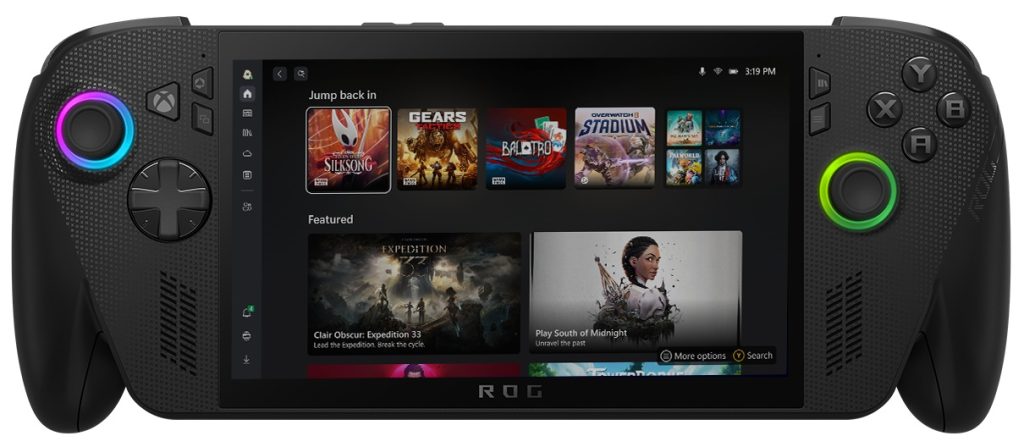
Microsoft has introduced new Xbox updates for Windows PCs and handheld devices, designed to streamline how players access and manage their games and apps in one place.
Xbox Updates for PC and Handheld
Jason Beaumont, VP of Experiences at Xbox, noted in the announcement blog that the changes are based on feedback from Xbox Insiders and the wider community, introducing new tools to enhance the overall experience. The updates include:
Aggregated Gaming Library
A new aggregated library combines games from multiple PC storefronts—including Xbox, Xbox Game Pass, Battle.net, and other supported platforms—into a single view within the Xbox PC app.
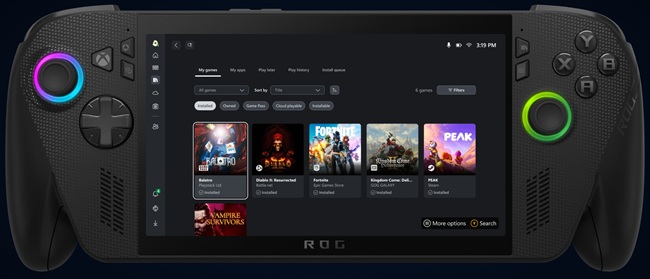
- Installed games automatically appear in My Library and the Most Recent sidebar.
- Players can quickly return to their favorite titles with a single click.
Customizable Library View
Users can manage how their library looks by turning storefronts on or off:
- Select Profile Picture
- Go to Settings > Library & Extensions
- Toggle storefront listings as needed
This allows players to simplify the view and control what appears in their library.
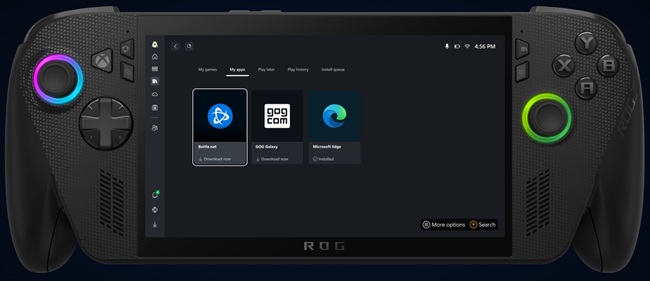
My Apps Tab
A new My Apps section within the library brings third-party apps and storefronts together. Players can find, install, and launch games from different platforms without switching between multiple apps or the desktop.
Cloud Sync Across Devices
Later this month, cloud-playable titles and play history will sync across console, PC, and handheld devices.
- Use the “cloud playable” filter in My Games to view supported titles.
- Access the “Jump back in” list on the Home screen to continue sessions across devices seamlessly.
Availability
- The aggregated gaming library is available to all players starting today.
- The cross-device cloud play and synced history feature will roll out later in September.