
Home » Nokia, Software, Symbian

Music Player With Lyrics Available For Nokia 5800 XM, X6 And 5230

on November 30, 2010 – 5:25 pm29 Comments

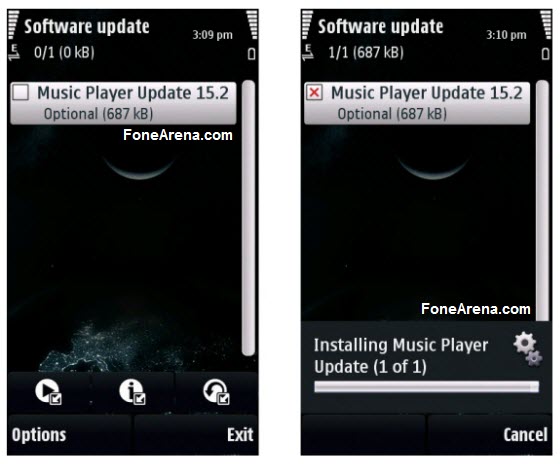
Nokia recently released a new update for its popular touchscreen phones, Nokia 5800 XpressMusic, X6 and 5230. The latest update comes with the new Music Player with lyrics. The new feature displays the embedded lyrics of the song playing on your device. This update is currently available only via Over-The-Air (OTA).

How to Enable This Feature?

  1. Download and install the update
  2. Restart your phone
  3. Go to Music Player
  4. Click on Options menu of Now Playing view and
  5. Enable the feature when lyrics are available

To download this update, go to Menu > Applications > SW Update. You may have to wait for few days, before this update is available in your region. If you find something new, let us know in the comments below.

Related Posts with Thumbnails

Omkar Dutta is a 19yrs old Technology Blogger from Mumbai, India. He is currently studying Bachelor of Management Studies. He loves to check out latest software, mobile phones and web services. Currently he writes for Fone Arena,Techie Buzz and Tech PP. You can follow him on Twitter @0mkarr

  • ARPIT

    but, there’s no option like summary in properties!! please help!!!

  • Assassin

    @ARPIT: Dude, you’ve just got to open the SW Update app on your device and it should come up there. Download the update and you’ll be done.

    To see the lyrics of a particular mp3, first of all that mp3 should contain the lyrics. One has to manually embed the lyrics in the mp3 file first, only then can the lyrics be displayed on the phone.

    You can use MiniLyrics plugin with Windows Media Player to easily embed lyrics in an mp3 file.

  • Ivan

    I confirm ARPIT’s comment, there is no Music Player update anymore. I’m trying to find some app for manual installation, if anyone found the solution, please help!

  • Sam

    I also tried update few times, but also cannot see show/hide lyric option. I found that i can’t even add playlist from my memory card.
    Any pro can help??

  • bonebonebone

    just update your phone thru ovi suite.. in there, u will see the update button.. then you will se an update for the music player.. after you update it restart your phone and it works fine!!!