
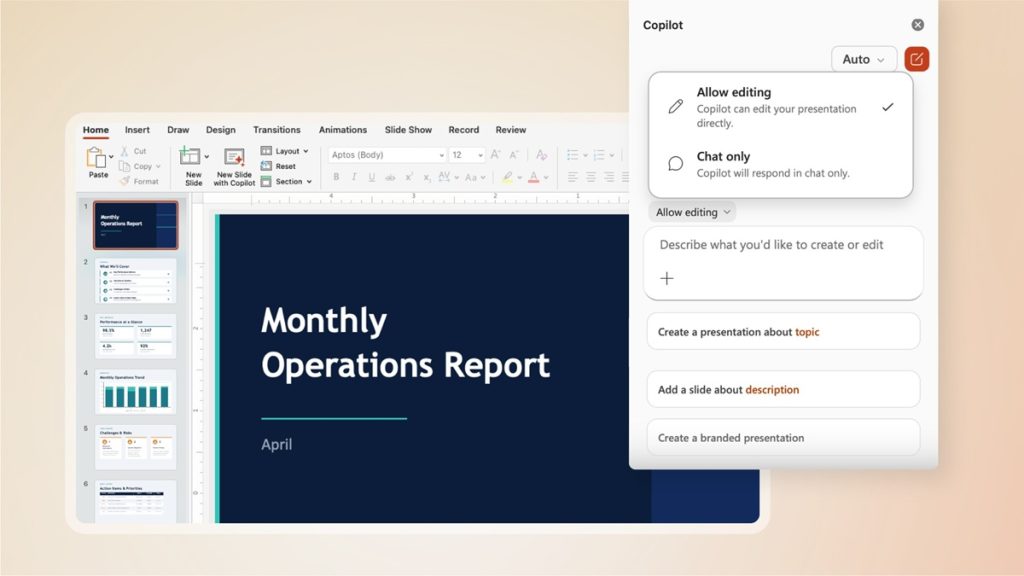
Microsoft Copilot is receiving an update across Microsoft Word, Microsoft Excel, and Microsoft PowerPoint. Microsoft has announced that agentic capabilities in these applications are now generally available.
With this update, Copilot can take multi-step, app-native actions directly within documents, worksheets, and presentations. This experience is now the default and is designed to allow users to move from initial drafts to final output while maintaining control over changes.
Microsoft also states that this updated experience is already being used in real work scenarios, with early customer feedback indicating increased engagement and higher satisfaction.
From passive assistant to action-driven system
When Copilot was first introduced, foundation models were not capable of reliably controlling applications. At that stage, Copilot functioned as a passive assistant—it could respond to prompts and answer questions but was not able to take action directly within documents.
Over time, improvements in instruction following, reasoning, and output quality have enabled Copilot to perform multi-step edits more reliably while preserving user intent. These advancements allow it to interact with application-specific elements such as citations in Word, pivot tables in Excel, and animations in PowerPoint.
This progression enables Copilot to operate as a system that can take high-level instructions and execute tasks within applications.
Key principles behind the update
Microsoft says the updated experience is based on several observations during development:
- Performing actions such as formatting, restructuring, building visuals, and transforming data provides more value than only suggesting steps
- Users need the ability to review changes, keep selected outputs, and maintain control over structure, style, and formatting
- Context improves output quality, supported by Work IQ, which uses signals from user work to better understand intent and generate results
- Multiple models are used depending on the task, allowing flexibility across different use cases
- A consistent interaction model is maintained across Word, Excel, and PowerPoint, while still supporting the specific capabilities of each application
Early usage trends
Microsoft shared data from the past month showing changes in engagement, retention, and satisfaction:
- Word: Engagement increased by 52%, retention by 11%, satisfaction by 21%
- Excel: Engagement increased by 67%, retention by 50%, satisfaction by 65%
- PowerPoint: Engagement increased by 11%, retention by 36%, satisfaction by 25%
These figures reflect usage patterns following the introduction of agentic capabilities.
Copilot across applications
Word
In Word, Copilot can generate drafts, rewrite content, restructure documents, and adjust tone based on context.
Excel
In Excel, Copilot can explore data, create and modify formulas, organize tables, generate visuals, and explain analysis within the workbook.
PowerPoint
In PowerPoint, Copilot can create presentations, update existing slides with the latest talking points and data, and structure content into a narrative while aligning with company templates.
What’s next
Microsoft states that it will continue improving Copilot across Word, Excel, and PowerPoint.
The next phase focuses on expanding the range of native actions Copilot can perform, particularly for complex workflows such as financial spreadsheets and legal documents. The company is also working on improving transparency by making it easier to preview changes, understand what was modified and why, and adjust outputs.
Further updates aim to create a more unified Copilot system across applications, bringing together entry points, suggestions, and workflows while making Copilot more proactive in assisting users.
Availability
The updated Copilot experience is now generally available and enabled by default for:
- Microsoft 365 Copilot users
- Microsoft 365 Premium subscribers
- Microsoft 365 Personal and Family plans
Users can access these features through Microsoft 365 applications. Microsoft also directs users to Microsoft365.com/copilot or the Microsoft 365 mobile app to get started.