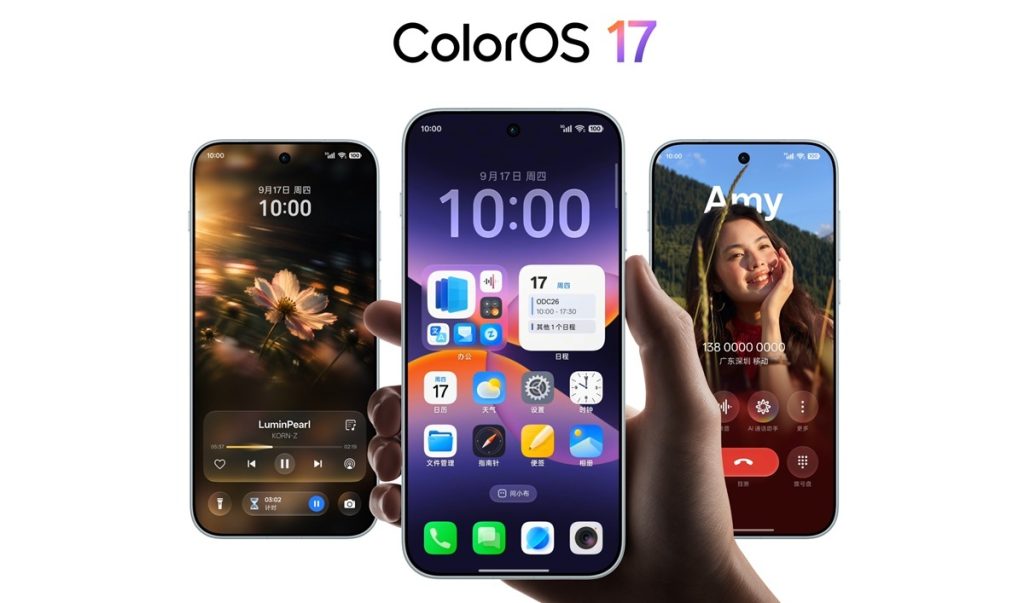
OPPO has announced ColorOS 17 in China, bringing updates across system fluidity, AI, imaging, productivity, sports, accessibility, security and cross-device connectivity.
Fluid Design
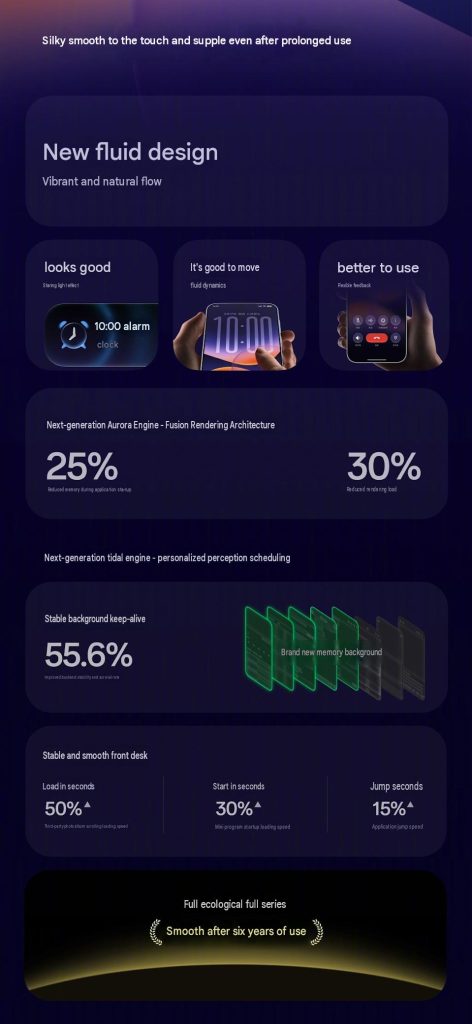
ColorOS 17 introduces Fluid Design with consistent visuals, animations and touch feedback across the system. The Aurora Engine integrates with the rendering architecture, while Fluid Animation carries transitions across the interface. The clock, for example, transitions between the lock screen and home screen during unlocking, while other interface elements flow between screens during interactions.
Elastic Feedback lets buttons, selection boxes and other interface elements stretch or squeeze in response to force before returning to their original form. Condensate visual effects make interface elements more translucent while keeping icons and text readable, with light following finger movement to indicate status and progress.
The Tidal Engine learns app usage frequency, preferences, duration and intent to schedule system resources. Its memory-retention capabilities keep background apps available when users return to activities such as scrolling feeds, watching shows or filling out forms.
Key performance changes include:
- Background app retention: +55.6%
- App launch stability: +35%
- Third-party photo gallery scrolling and loading: +50%
- Application launch runtime memory: -25%
- Rendering load: -30%
- Mini-program launch load: +30%
- App jump speed: +15%
OPPO AI
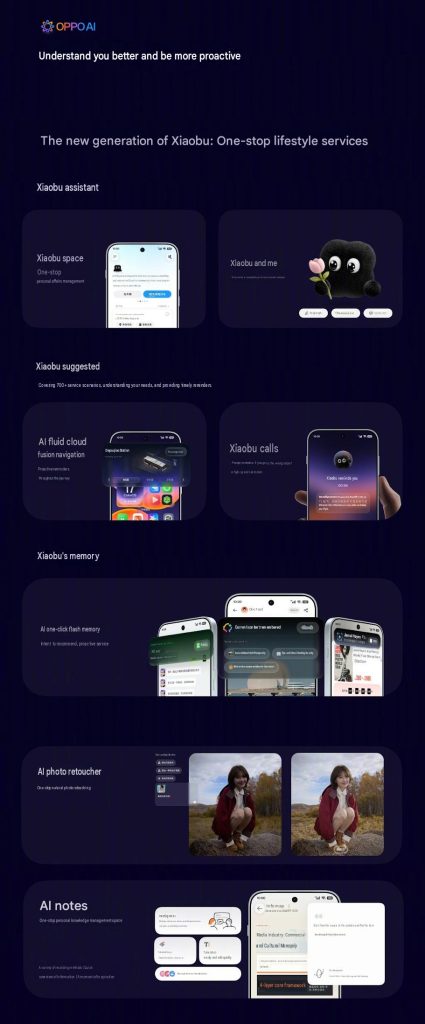
ColorOS 17 expands the Heytap Assistant, also known as Breeno or Xiao Bu Assistant. Xiao Bu manages personal affairs through Xiao Bu Space, identifies urgent matters and provides access to relevant service portals. It also tracks to-dos and priorities, such as overdue credit card payments or forgotten scenic-spot reservations, with “OK!” providing one-step access to the relevant service.
For travel, users can generate a detailed graphic itinerary with a single sentence and import it into Xiao Bu Space. It breaks the plan into to-dos, transportation, accommodation information and precautions, while providing ticket, check-in and car rental services.
Users can define Xiao Bu’s forms of address and expression styles, while Xiao Bu remembers habits, interests and recent activities. Xiao Bu Suggestions recognizes habits, user state and surroundings and covers more than 700 service scenarios.
For travel specifically, Xiao Bu can:
- Before departure: Perceive flight information, traffic and weather.
- After security: Display the boarding pass.
- Upon arrival: Prepare taxi services.
- Wrong destination: Recognize an incorrect airport, high-speed railway station or terminal selection and remind users to change the destination.
AI Fluid Cloud combines navigation with active reminders for walking, buses and subways, showing the nearest subway entrance, upcoming transfers and the station where users need to get off.
AI One-Touch Flash Note supports saving courier pickup codes, adding contact information and setting ticket-grabbing alarms. Its intent recommendation can identify next-step requirements and provide related questions or services.
AI Snap-and-Shoot, also called AI Pai-Yi-Pai, lets users:
- Objects: Understand objects instantly.
- Documents: Make documents clearer.
- Calories: Get calorie information.
- Wi-Fi: Connect to Wi-Fi.
AI Imaging and Productivity
The AI Photo Editor uses the DaVinci visual understanding large model for one-stop editing. Users can provide a single-sentence instruction or use a reference image for its color, lighting or skin tone. It can also recommend photo editing commands and templates.
AI Memory Gallery creates an AI album photobook using photo compilation and copywriting to form Plogs. Seamless Album Direct Connection links third-party cameras and NAS devices, allowing users to view the latest footage without occupying local phone storage. Insta360 GO Ultra is cited as an example of a third-party camera.
On the productivity side, AI Notes lets users listen and take notes simultaneously during meetings. Users can also import videos, books and ideas with a single click and build structured knowledge notes.
Other AI Notes capabilities include:
- Information Overview Diagram: Creates an editable information overview diagram with sharing formats for meeting conclusions or personal insights.
- Flash of Insight: Identifies valuable viewpoints and helps users recognize their thoughts and blind spots.
- AI Conversation Translation: Works with OPPO earphones to translate the other person’s language into the user’s ear in real time and broadcast the user’s expression through the phone speaker.
Sports and Connectivity
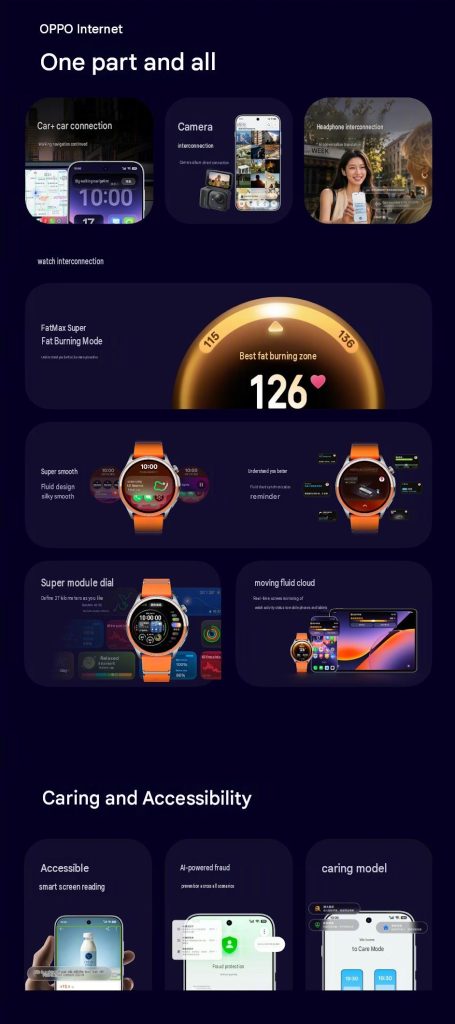
ColorOS 17 adds connectivity across cars, cameras, earphones and watches:
- Car+ Connectivity: Provides intelligent driving and navigation bridging.
- Camera Interconnection: Connects third-party cameras and NAS devices.
- Earphone Interconnection: Supports instant pairing and live translation routing.
Watch integration includes FatMax personalized fat-burning heart rate zones, real-time voice coaching and workout statistics synchronized to phones or tablets. Super Fat Burning Mode provides personalized heart rate zones and voice guidance during exercise.
Sports Fluid Cloud synchronizes heart rate and calorie consumption to a phone or tablet in real time. It supports activities such as watching videos on an incline treadmill or following fitness aerobics, allowing users to view movement and personal state without frequently raising the wrist.
Watch Air Gestures let users control a connected phone:
- Double pinch: Switch songs or videos.
- Flip wrist or double tap: Skip backward.
- Remote shutter: Control the phone’s camera shutter.
Accessibility and Security
Accessible Smart Screen Reading adapts to missing TalkBack labels in more third-party applications. AI understands touched text, buttons and images and describes them through voice for scenarios including hailing a ride, traveling, shopping and entertainment.
Accessible Live-View Conversation uses the camera to capture the scene. AI provides voice guidance for shooting angles, describes objects with more refined language and answers questions.
ColorOS 17’s AI anti-fraud features include:
- AI Cross-App Anti-Fraud: Identifies user behavior chains and fraudulent links across calls, web browsing and app installation that can lead to induced payments, while providing reminders and recording the risk-event process.
- AI Face-Swapping Detection: Detects AI face-swapping traces in real time during video calls and reminds users to verify the other party’s identity.
- AI Call Anti-Fraud: Uses a new semantic large model to identify scam scripts and AI-synthesized voices across first-party and third-party applications.
ColorOS 17 Rollout Plan
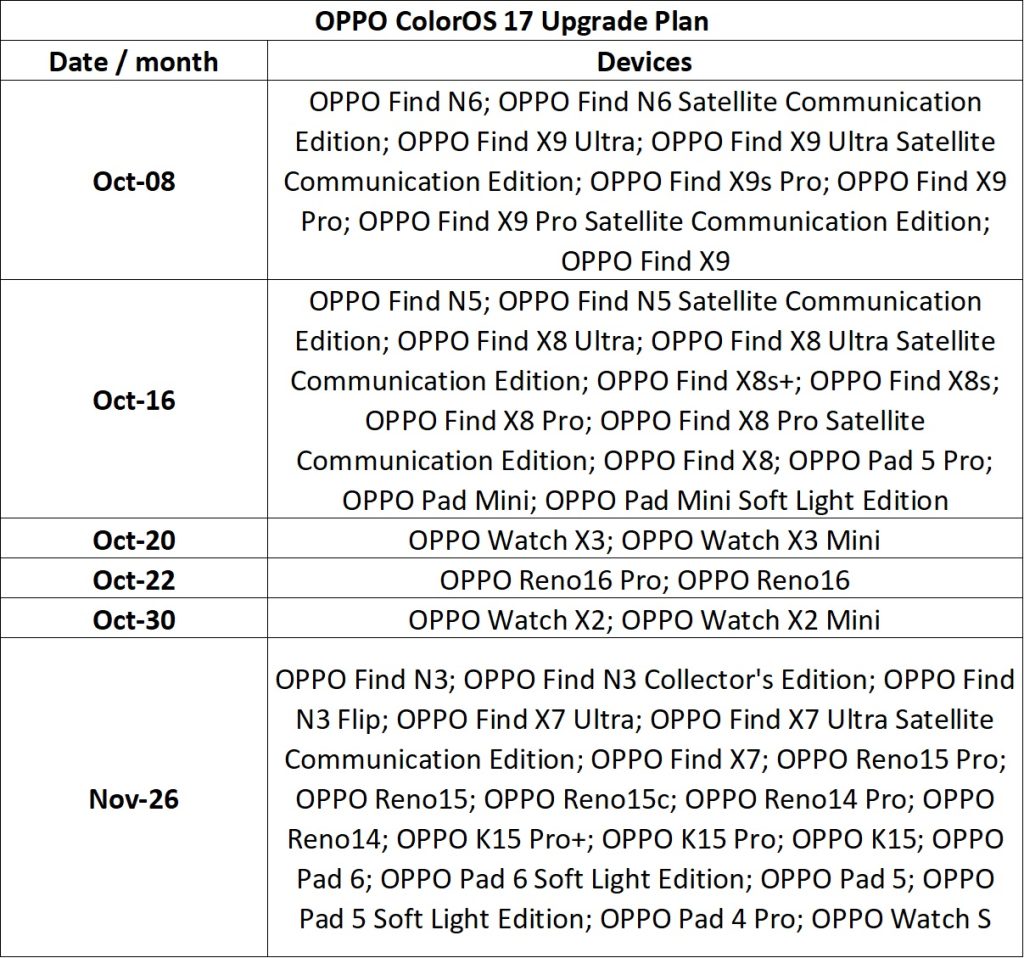
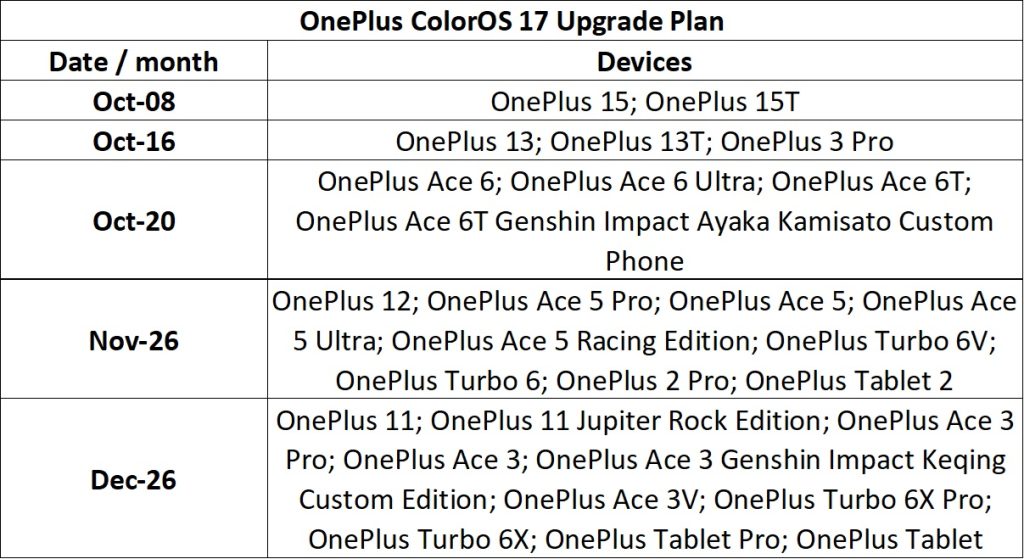
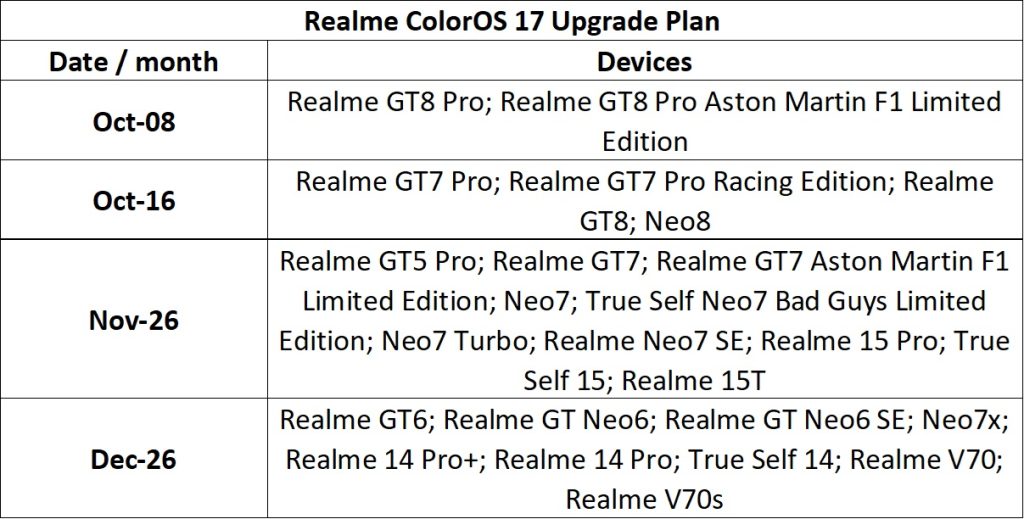
The company confirmed that the OPPO Find X10 series, OnePlus 16 and OPPO Watch S2 will be among the first devices to debut ColorOS 17. It also shared the upgrade plan for devices in China, including OPPO, OnePlus and realme models, as follows: