
Mistral AI has introduced Mistral OCR 4, a new optical character recognition (OCR) model designed for enterprise document understanding. Unlike previous versions that mainly converted documents into text and tables, OCR 4 produces structured document outputs with bounding boxes, block classification, and confidence scores for every page and word.
The small, focused model supports 170 languages across 10 language groups, accepts multiple enterprise document formats, runs inside a single container for fully self-hosted deployments, and is designed as an ingestion component for enterprise search, Retrieval-Augmented Generation (RAG), and domain-specific retrieval pipelines.
What’s new in Mistral OCR 4
OCR 4 extracts both document content and its structure. Along with recognized text, it returns:
- Bounding boxes for every detected element
- Block classification
- Page- and word-level confidence scores
- Markdown-formatted structured output
This structured output supports semantic chunking for RAG, enterprise search, document ingestion and indexing pipelines, domain-specific retrieval pipelines, AI agents for form filling, invoice processing and compliance checks, and custom document connectors.
Enterprise capabilities
OCR 4 accepts common enterprise document formats, including PDF, DOC, PPT, and OpenDocument, and supports 170 languages across 10 language groups, including specialized and low-resource languages.
The compact model runs inside a single container, making it suitable for cost-sensitive and high-volume deployments. It can also be fully self-hosted, allowing organizations with strict data-sovereignty, privacy, or compliance requirements to keep document data entirely within their own infrastructure.
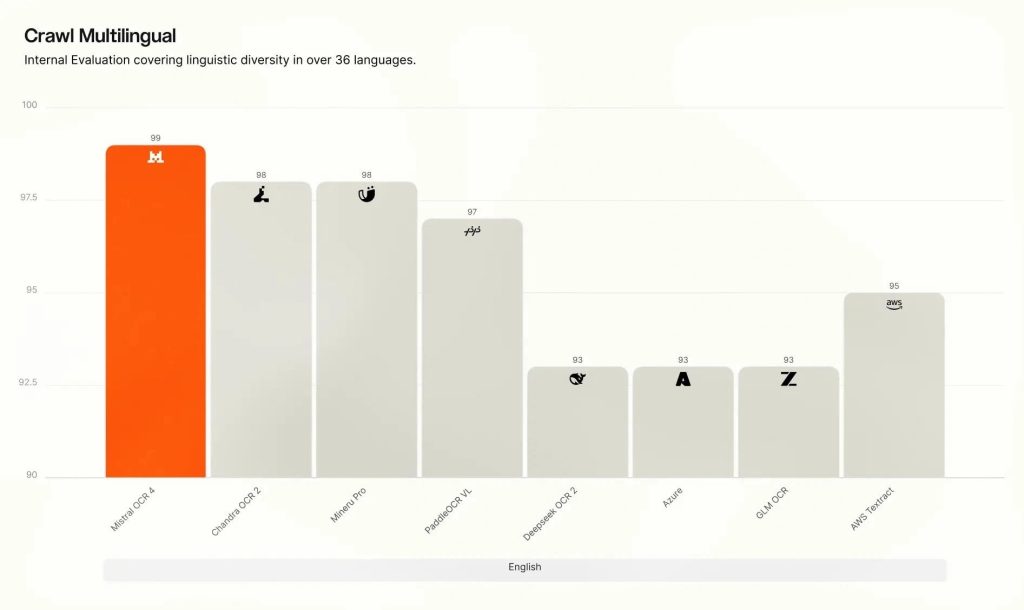
On Mistral’s internal Crawl Multilingual evaluation, OCR 4 led across all eight language groups. According to Mistral, OCR 4 showed its widest performance advantage in specialized and low-resource languages, where many competing OCR systems typically lose accuracy.
Benchmark performance
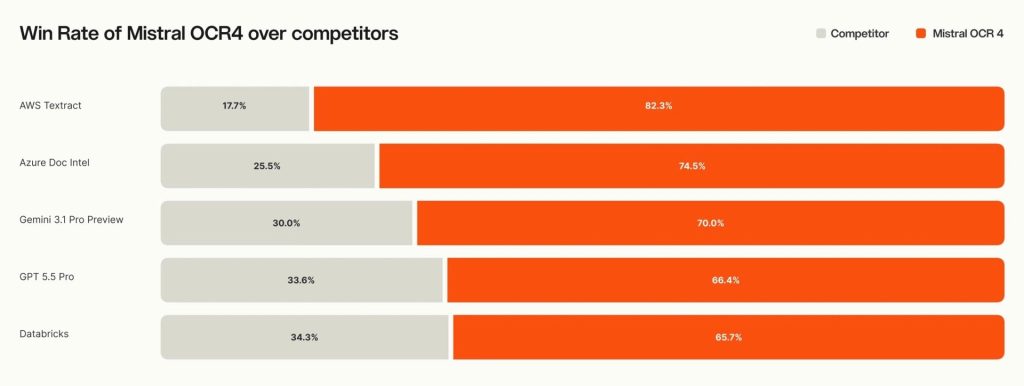
Mistral AI evaluated OCR 4 against AI-native OCR models, frontier general-purpose models, enterprise document services, and its previous OCR 3 model. In a blind human preference evaluation involving more than 600 real-world documents across 12+ languages, sourced from third-party vendors and reviewed by independent annotators, OCR 4 was preferred over competing systems in the majority of documents tested.
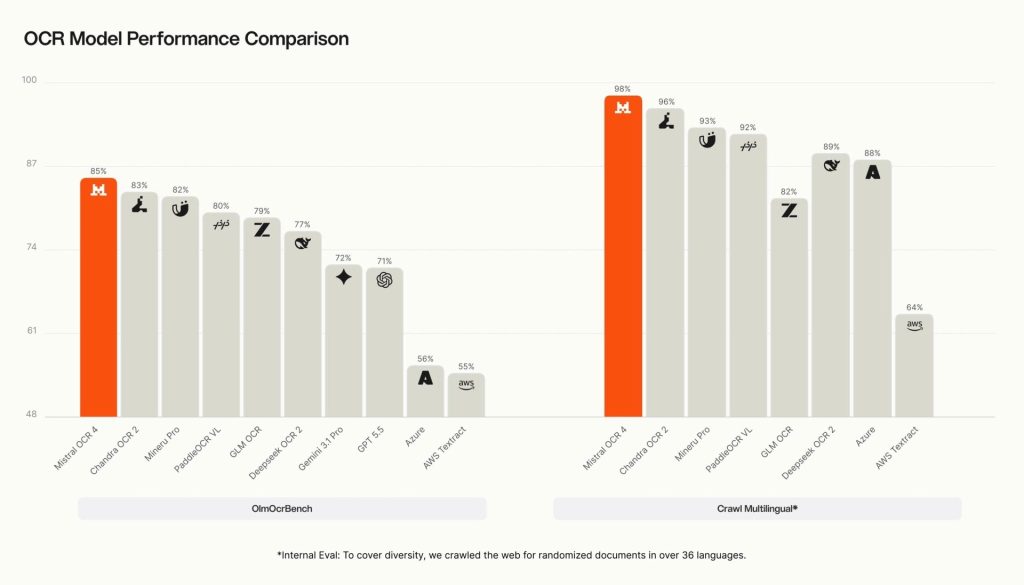
According to the company, OCR 4 also achieved:
- 85.20 on OlmOCRBench
- 93.07 on OmniDocBench
- 0.98 on Mistral’s internal Crawl Multilingual evaluation
Mistral says benchmark scores should be treated as directional because issues such as incorrect ground-truth annotations, equivalent mathematical notation, equation segmentation, multi-column reading order, and header/footer attribution can penalize otherwise correct outputs. The company recommends evaluating OCR 4 using an organization’s own documents.
OCR 4 API vs Document AI
Developers can integrate OCR 4 directly through the API, while business users can access the same OCR engine through Document AI in Mistral Studio as a no-code workflow.
Use OCR 4 when you need:
- Raw extracted text and markdown output
- Bounding boxes, block classification, and confidence scores
- High-volume document ingestion with Batch API support
- Self-hosted deployments for privacy, sovereignty, or compliance
- Direct integration into applications, AI agents, and enterprise data pipelines
Use Document AI when you need:
- Structured JSON output using custom schemas
- Image annotation with structured JSON
- Prompt-based document interpretation and summarization
- Domain-specific structured outputs
- Structured results without building downstream parsing logic
Every request returns OCR 4’s extracted content, including text, markdown, bounding boxes, block types, and confidence scores. Document AI adds structured processing, custom prompts, schemas, or image annotations on top of the OCR output using the same API endpoint.
Recommended use cases
OCR 4 is designed for:
- Complex multilingual document parsing and extraction
- Enterprise search and Retrieval-Augmented Generation (RAG)
- AI agent workflows for form filling, invoice processing, and compliance checks
- Structured extraction, redaction, and verification pipelines using confidence scores
According to Mistral, early users are using OCR 4 to convert invoices into structured fields, digitize company archives, extract clean text from technical and scientific reports, and power enterprise search. OCR 4 output can also be integrated directly into retrieval pipelines using the company’s Search Toolkit.
The company notes that OCR 4 is a document-understanding model and is not intended for medical diagnosis, legal advice or judgment, high-stakes financial decisions, safety-critical systems, real-time or latency-sensitive processing, or non-document inputs such as audio and video.
Pricing and availability
Mistral OCR 4 is available through the Mistral API, while Document AI, powered by OCR 4, is available in Mistral Studio for no-code document processing. Both are also available via API through Amazon SageMaker and Microsoft Foundry, with support for Snowflake Parse Document coming soon.
Organizations with strict privacy, sovereignty, or compliance requirements can deploy OCR 4 entirely within their own infrastructure using the self-hosted option.
Pricing is as follows:
- OCR 4 API: USD 4 (Rs. 378 approx.) per 1,000 pages
- Batch API: USD 2 (Rs. 189 approx.) per 1,000 pages (50% discount)
- Document AI: USD 5 (Rs. 473 approx.) per 1,000 pages