
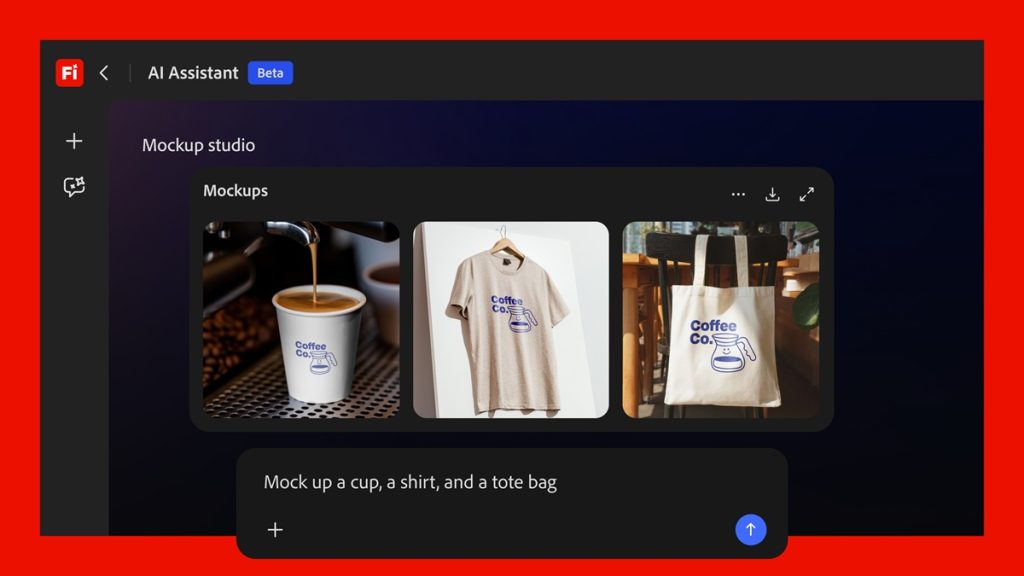
Adobe today announced the public beta of Firefly AI Assistant inside Adobe Firefly, bringing its vision of agentic creativity into a globally available release.
The assistant is rolling out as part of Adobe’s creative AI studio and is designed to convert natural language instructions into multi-step creative workflows across Adobe applications. It also arrives alongside broader Firefly platform updates that expand model support and editing capabilities.
The assistant is powered by Adobe’s creative agent system, which executes tasks across Creative Cloud apps while users define the creative direction through text-based prompts.
Firefly AI Assistant
Firefly AI Assistant enables users to describe what they want to create in natural language and have the system execute workflows across Adobe tools such as Photoshop, Lightroom, Premiere Pro, Illustrator, and Firefly.
It supports use cases such as turning product images into social assets, creating mood boards from briefs, and refining headshots. The system manages multi-step execution across applications instead of requiring users to switch between tools manually.
Users remain in control of creative direction, adjustments, and final outputs, while the assistant handles execution and tool coordination.

Key features
- Single chat-based interface for creating and editing content using natural language prompts
- Multi-step workflow execution across Adobe apps including Photoshop, Lightroom, Premiere Pro, and others
- Access to 60+ pro-grade tools such as Generative Fill, Auto Tone, Remove Background, Vectorize, and Presets
- Creative Skills offering pre-built workflows for batch editing, mood boards, portrait retouching, social media variations, and product mockups
- Support for creating and editing across photos, videos, and design assets
- Step-by-step process visibility with options to refine, redirect, or take control at any stage
- Direct saving of outputs to Creative Cloud storage for use across Adobe applications
Use cases
Adobe explains that Firefly AI Assistant can streamline common creative tasks by turning user instructions into finished outputs across its tools. Examples include:
- A social media creator can upload an image and generate platform-specific versions with optimized crops and layouts for apps like Instagram, TikTok, Snapchat, and Facebook while maintaining composition.
- A designer can upload a logo and packaging image, and the assistant places the design realistically by adjusting scale, lighting, alignment, and perspective. Follow-up prompts can be used for refinements before final output.
Third-party integration plans
Adobe is working on extending its creative agent capabilities to third-party AI platforms such as Anthropic’s Claude. This approach is intended to make Adobe’s creative tools accessible within external environments where users already operate.
Adobe states that Firefly AI Assistant provides a more complete experience, including visibility into how assets evolve at each step, access to a full set of pro-grade tools, and personalization based on user preferences over time.
Availability
Firefly AI Assistant public beta is rolling out globally for users on Creative Cloud Pro and paid Firefly plans, including Pro, Pro Plus, and Premium tiers, with eligible users receiving daily refreshing generative credits during the beta period for use with the assistant.