
Google Play is updating its technical quality requirements with a new Android vitals metric that tracks excessive partial wake lock usage. Developed with input from Samsung and refined using feedback from developers, the metric aims to help identify background behaviors that contribute to battery drain. It is now available to all developers following the completion of its beta phase.
Excessive Partial Wake Locks Metric
The metric evaluates how long an app holds partial wake locks during user sessions. A session is considered excessive if the app accumulates more than 2 hours of non-exempt wake locks within a 24-hour period.
Wake locks held by the system that clearly support user-driven actions—such as audio playback or data transfers initiated by the user—are classified as exempt.
An app crosses Google Play’s threshold when 5% of its user sessions in the last 28 days exceed this limit. Android vitals highlights this condition through alerts on the overview page when it occurs.
Google Play’s Core Technical Quality Metrics
Apps are expected to remain below these bad behavior thresholds to maintain visibility across Play Store surfaces:
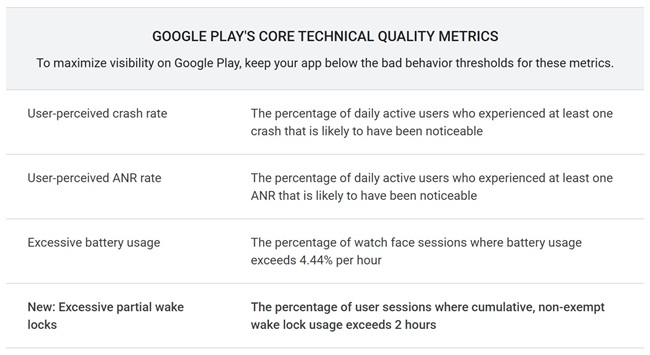
User-perceived crash rate
- Overall: 1.09%
- Per phone model: 8%
- Per watch model: 4%
User-perceived ANR rate
- Overall: 0.47%
- Per phone model: 8%
- Per watch model: 5%
Excessive battery usage
- Overall: 1%
- Per watch model: 1%
New: Excessive partial wake locks
- Overall: 5%
Google notes that this metric is the first in a series aimed at offering broader insight into how apps use system resources across the Android ecosystem.
Wake Lock Diagnostics in Android Vitals
To help developers understand wake lock behavior more precisely, Android vitals now includes an expanded wake lock names table. The table lists wake lock tags with their P90 and P99 duration values, helping pinpoint tags that keep the device awake for extended periods.


Google recommends examining any wake lock with P90 or P99 durations exceeding 60 minutes, as these may indicate areas for optimization. Developers can reproduce and evaluate these behaviors in local environments, including Android Studio.
Google Play Visibility Impact
Titles that exceed the excessive wake lock threshold may lose access to some discovery surfaces on Google Play. In addition, Google may display a battery drain warning on the app’s store listing to notify users when wake lock activity may reduce battery life.

Next Steps for Developers
- Review Android vitals data: Developers can now check their app’s performance for excessive partial wake locks directly in Android vitals.
- Identify problematic tags: Use the wake lock names table to locate tags with unusually long durations.
- Refer to updated resources: Google has published revised documentation, technical guidance, and videos covering wake lock best practices and common issues.
Visibility and Enforcement Timeline
The excessive partial wake lock metric is now part of Google Play’s core technical quality bars. Apps that exceed the threshold may face reduced visibility and, in some cases, a warning on the store listing about potential battery drain. These visibility changes will take effect starting March 1, 2026.