
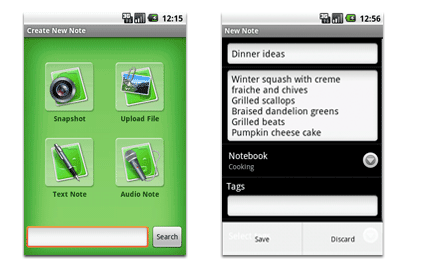
Evernote, our favourite note taking application has now landed on Android Phones.
You can do everything in this Android Client that can be done by the Desktop Evernote i.e. Taking Notes, photos, Recording Audio Clips etc.
A special feature however, in this client, is that, you can attach any file less than 25MB onto your notes, if you are a premium subscriber. Free subscribers are limited to only PDF, text, audio and image files.
And obviously without a say, all your notes gets sync-ed with your web account and any other Evernote Client that you use and vice versa.
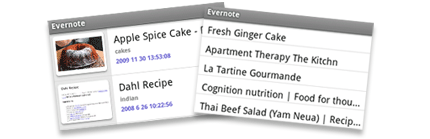
You can choose between either a fancy thumbnail view or a simpler list view depending on your network speed to view the notes on Android. If you are on a speedy and flat rate network, we recommend you go for the thumbnail view, else you can go for the list view if you are on a slower network, or on a pay per use data network.
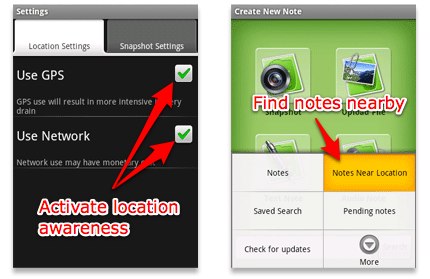
Evernote for Android also capture the user’s location whenever he or she creates a note, and later find that note based on their proximity to the current location. Just Head over to “Settings Menu” and make sure that the “Location Settings” are enabled to make use of this feature. And once your phone gets connected to internet, the “Notes Near Location” option will appear in the main Evernote menu.
To Install Evernote on your Android Phone, just search for “Evernote” on the Android Market and Download it.
Evernote for Android works on all the devices running on Android OS 1.5 or later.