
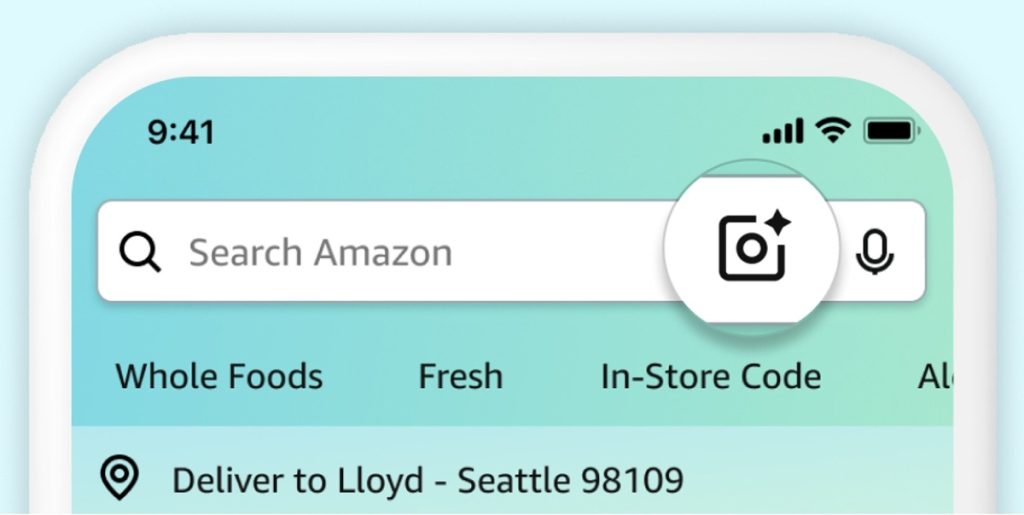
Amazon has shared details of eight visual search features and enhancements designed to help customers find and discover products more efficiently across its shopping platform. The features use AI-generated imagery, image recognition, camera-based search, and visual filtering tools to make product searches more precise.
1. Real-time AI-generated images in search
Amazon has introduced an AI-powered search experience in the Amazon Shopping app that generates images in real time as customers type product descriptions into the search bar.
The feature is intended for shoppers who know how an item looks but may not know the exact term for it. For example, a customer may be searching for a shirt with a draped collar without knowing the term “cowl neck,” or a couch with woven side panels without knowing the word “rattan.”

As users enter descriptive details such as color, texture, or pattern, AI-generated images appear below the search bar and continue to update with each word added. Customers can select the image that most closely matches their idea and browse visually similar products. Amazon says the feature currently works in apparel and home categories, with support for additional categories planned over time.
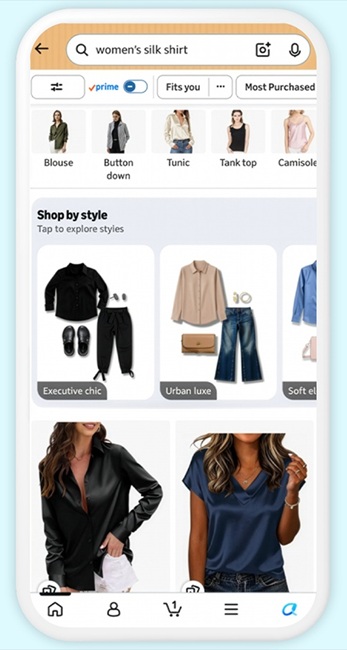
2. “Shop by Style” visual outfit discovery
Customers searching for apparel or accessories, such as a “women’s silk shirt,” can see AI-generated shoppable collages in search results under a “Shop by Style” section.
The collages are grouped into themes such as “Urban luxe” and “Soft elegance.” Selecting a collage opens a curated page where customers can shop featured items, explore similar products, and swipe between different style collections.
3. Lens Live visual search
Amazon Lens Live uses AI to identify products through a smartphone camera and display matching items in a swipeable carousel at the bottom of the screen.
Customers can compare products, add items to their cart, or save products to wish lists without leaving the camera view.

Lens Live also integrates Alexa for Shopping, allowing users to view product summaries, explore suggested questions, and select “Ask about this” for additional information. Amazon gives the example of asking, “How do I remove this coffee stain from my rug?”
If the camera cannot identify an item, Lens Live generates descriptive captions of what is visible in the scene to provide a starting point for further searches.
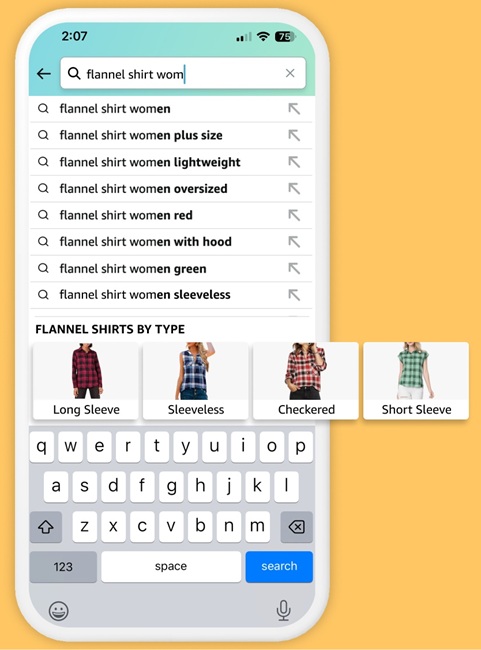
4. Visual Suggestions for search refinement
When customers enter broad visual searches, such as “flannel shirt,” Amazon displays visual filters while they are typing. Users can select the image that best matches what they are looking for, helping narrow search results and surface more relevant products.
5. Adding text to image searches
Amazon Lens allows customers to upload an image and add text instructions to refine search results.
For example, a customer can upload a photo of a beige three-seat sofa and enter a request such as “like this, but in white.” Users can also specify details including brand, color, material, or dimensions.

Amazon then surfaces products that match both the uploaded image and the accompanying text description.
6. Amazon Lens lock screen widget
iPhone users can launch Amazon Lens Camera Search directly from their lock screen using a dedicated widget.
To add the widget, users can press and hold the lock screen until the “Customize” option appears, select “Lock Screen,” tap “Add Widgets” below the clock, locate the Amazon Shopping app, and swipe left to add Amazon Lens.
Amazon says the Lens widget can also be used alongside the existing Search and Orders widgets. This setup allows customers to perform visual searches, access text-based searches, and track orders directly from the lock screen without navigating through multiple apps.
The feature enables users to search for items they see in the real world in real time.
7. “More Like This” recommendations
The “More Like This” feature helps customers find visually similar products directly from search results.

For example, if a customer likes a dress shown in search results but wants a version with sleeves or a different length, selecting “More Like This” can surface similar alternatives.
8. Circle to Search in Amazon Lens
Amazon Lens includes a Circle to Search feature that allows customers to focus on a specific object within an image.
After uploading an image, users can draw a circle around the item they want to search for. They can also resize or move the bounding boxes to focus on a different object within the same image.

This allows more targeted searches when multiple products appear in a single photo.
Availability
Amazon says the real-time AI-generated image search feature and the “Shop by Style” experience are rolling out to customers in the United States through the Amazon Shopping app on iOS and Android. Additional product categories will be added over time.