
Google has released the Gemini 2.5 Computer Use model, a new specialized version built on Gemini 2.5 Pro’s visual understanding and reasoning capabilities.
Gemini 2.5 Computer Use model
The model enables AI agents to interact directly with graphical user interfaces (UIs) — performing actions such as clicking, typing, and form-filling — similar to human users. According to Google, it delivers lower latency and outperforms leading alternatives across multiple web and mobile control benchmarks.
Purpose
Google explains that while AI systems often interact with software through structured APIs, many digital workflows still rely on graphical interfaces. Tasks such as completing forms, selecting filters, or navigating menus require direct UI control.
The Gemini 2.5 Computer Use model addresses this by enabling agents to handle web and mobile applications directly, performing interface-level actions like scrolling, choosing dropdowns, and navigating login pages.
How it works
The model’s functionality is provided through the new computer_use tool in the Gemini API, which operates within a continuous loop. Each loop includes:
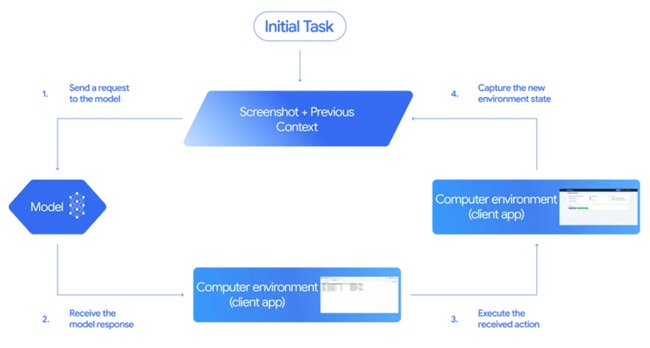
- Input: The user’s request, a screenshot of the current environment, and a record of recent actions.
- Model processing: The model analyzes the inputs and produces a function call representing a UI action, such as clicking or typing. For sensitive operations, such as purchases, it may request explicit user confirmation.
- Execution and feedback: Once the action is executed, a new screenshot and the current URL are returned to the model to continue the loop.
This process repeats until the task completes, an error occurs, or the interaction is stopped by a safety mechanism or user decision.
The model is primarily optimized for web browsers and shows strong early results in mobile UI control, though desktop OS-level automation is not yet supported.
Performance
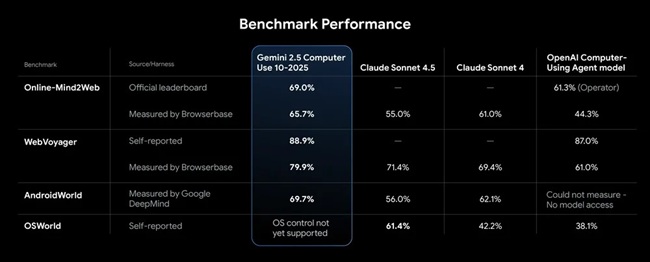
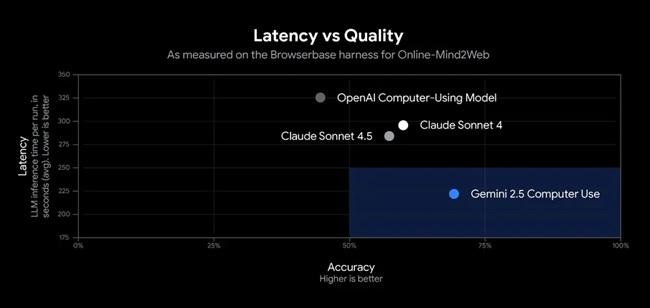
The Gemini 2.5 Computer Use model demonstrates strong results across several web and mobile control benchmarks. Google reports that it provides leading quality and efficiency for browser-based tasks, with the lowest latency recorded in Browserbase’s Online-Mind2Web benchmark evaluations.
Safety and controls
Google highlights the importance of safety when developing agents capable of computer control. Such systems pose specific risks, including possible misuse, unexpected model behavior, or malicious prompt injections.
To mitigate these, the Gemini 2.5 Computer Use model integrates built-in safety mechanisms described in the Gemini 2.5 Computer Use System Card and offers several developer safety features:
- Per-step safety service: An external, inference-time service that reviews every model-generated action before execution.
- System instructions: Allow developers to block or require confirmation for certain high-risk actions, such as bypassing CAPTCHAs, accessing secure systems, or interacting with medical devices.
Google also recommends that developers follow its documentation and best practices to thoroughly test systems before deployment.
Early use cases
Google has already deployed the model internally for multiple applications, including:
- UI testing to accelerate software quality assurance.
- Project Mariner and the Firebase Testing Agent, which automate interface-level testing.
- AI Mode in Search, enhancing interaction-based capabilities.
Participants in the early access program have also used the model for workflow automation, personal assistant development, and UI testing, reporting strong outcomes across scenarios.
Availability
The Gemini 2.5 Computer Use model is now available in public preview via the Gemini API on Google AI Studio and Vertex AI.
Developers can:
- Try it live through a demo hosted by Browserbase.
- Build locally using Playwright, or integrate it within a cloud environment using Browserbase’s APIs and reference examples.