

Google has outlined its vision for an “intelligent OS,” introducing new AI-powered capabilities for Android apps in a blog post by Matthew McCullough, VP of Product Management, Android Development. As users increasingly rely on AI assistants to complete tasks instead of navigating apps manually, Android is shifting toward a task-focused model where agents execute actions across applications.
The update introduces two core capabilities: AppFunctions, which enables structured AI integration, and an intelligent UI automation framework, designed to support broader app interactions. Both are currently in early beta and built with on-device execution, privacy, and user control in mind.
AppFunctions enables structured AI integration
AppFunctions allows Android apps to expose selected data and actions directly to AI agents and assistants.
Using the AppFunctions Jetpack library and related platform APIs, developers can define self-describing functions that AI systems can discover and execute through natural language. Similar to backend capability declarations via MCP-style cloud services, AppFunctions applies this model on-device, allowing execution to occur locally rather than on remote servers.
Samsung Gallery integration example
A working example is the integration between Samsung Gallery and Google Gemini on the Samsung Galaxy S26 series.
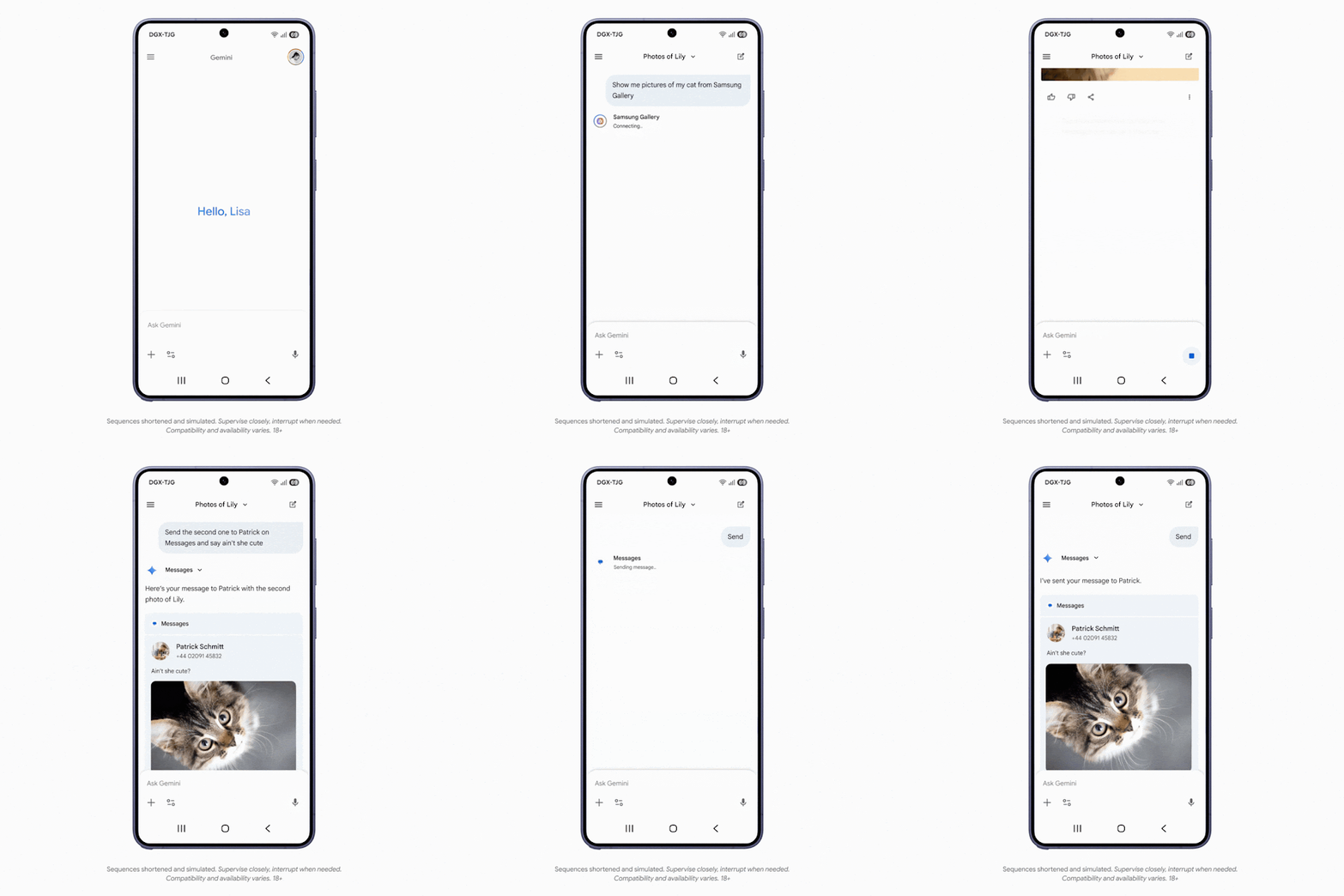
Instead of manually browsing albums, users can ask Gemini to display specific photos stored in Samsung Gallery. Gemini processes the request, triggers the relevant AppFunction, and presents the results directly inside the Gemini app without requiring users to switch applications.
The interaction supports voice and text input. Retrieved content can also be used in follow-up actions, such as sharing selected images in a message.
Supported app categories
Through AppFunctions, Gemini can automate actions across multiple categories, including:
- Calendar
- Notes
- Tasks
These capabilities allow users to coordinate schedules, manage reminders, and organize information through a unified assistant interface.
UI automation expands AI support without direct integration
For apps that do not yet implement AppFunctions, Android is developing a UI automation framework that enables AI agents to perform multi-step tasks within installed apps.
This system does not require developers to add new integrations. The platform performs the automation layer, extending AI-driven task execution without additional engineering effort.
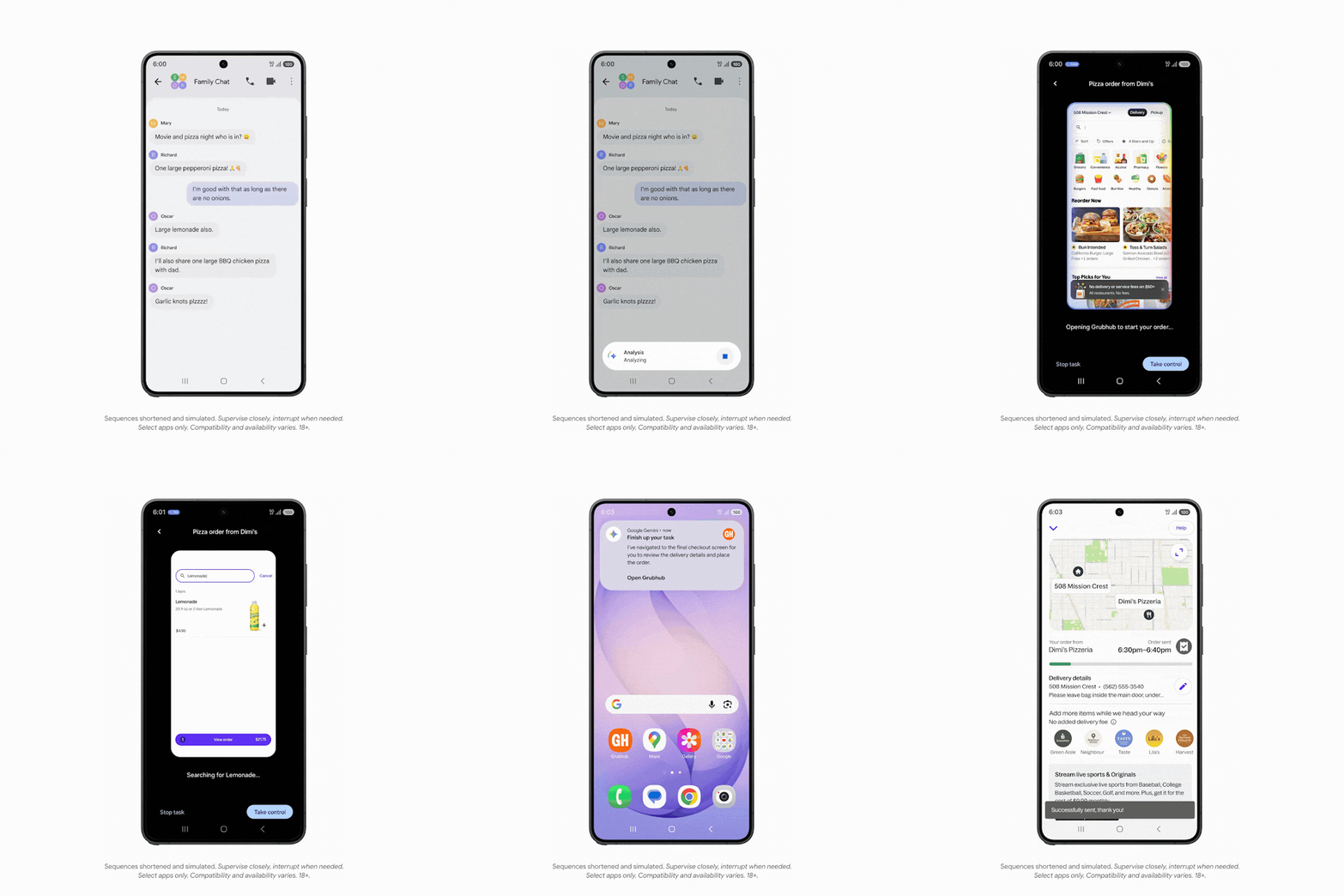
Users can delegate complex tasks to Gemini by long-pressing the power button. The feature will be introduced as a beta within the Gemini app.
Initially, it will support a curated selection of apps in the following categories:
- Food delivery
- Grocery
- Rideshare
Example tasks include placing customized food orders, coordinating multi-stop rides, and reordering previous grocery purchases. Gemini uses contextual information already available within apps to complete these workflows.
User transparency and safeguards
Android includes safeguards to maintain user awareness and control during automated actions:
- Users can monitor task progress through notifications or a live view interface
- Users can switch to manual control at any time
- Gemini prompts for confirmation before completing sensitive actions, such as purchases
These measures are designed to ensure transparency while automation runs in the background.
Availability
The Samsung Gallery and Gemini integration is currently available on the Samsung Galaxy S26 lineup and is expected to expand to Samsung devices running One UI 8.5 and later.
The UI automation preview is launching on the Galaxy S26 series and the Google Pixel 10 devices. It will initially roll out as a beta feature within the Gemini app.
Support at launch focuses on select apps in the food delivery, grocery, and rideshare categories, with initial availability in the United States and South Korea.
Looking ahead
Google plans to expand AppFunctions and UI automation capabilities in Android 17, extending support to additional users, developers, and device manufacturers.
The company is currently working with a limited group of app developers to refine integrations before a broader rollout. Further details on enabling agent-based app interactions are expected later this year.
With these updates, Android is moving toward a model where AI agents can execute tasks across applications, reducing the need for users to manually navigate between apps.