
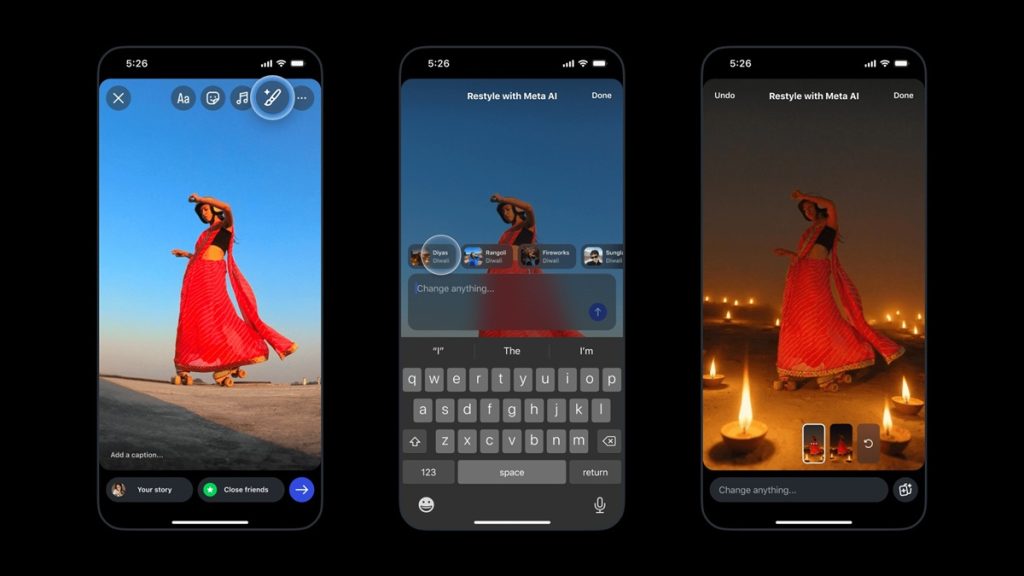
Meta-owned Instagram has introduced Diwali-themed image and video effects on Instagram Stories and the Edits app ahead of the festive season. These effects allow users to enhance photos and videos directly within the apps using Meta AI, without needing external tools.
Diwali Effects in Restyle
Instagram’s Restyle feature lets users transform content with festive visuals. This Diwali, several unique effects are available:
- Image Effects (Instagram Stories): Fireworks, Diyas, Rangoli
- Video Effects (Instagram Stories & Edits App): Lanterns, Marigold, Rangoli
The effects reflect Diwali’s traditional colors and vibrancy, enabling users to add festive touches to photos and videos.
How to Use Restyle on Instagram
- Open Stories by tapping the “+” on your profile photo or swiping left.
- Browse your gallery and tap the photo or video you want.
- Tap the Restyle button (paintbrush) on the top menu.
- Choose a Diwali effect: Images (Fireworks, Rangoli, Diyas); Videos (Lanterns, Marigold, Rangoli)
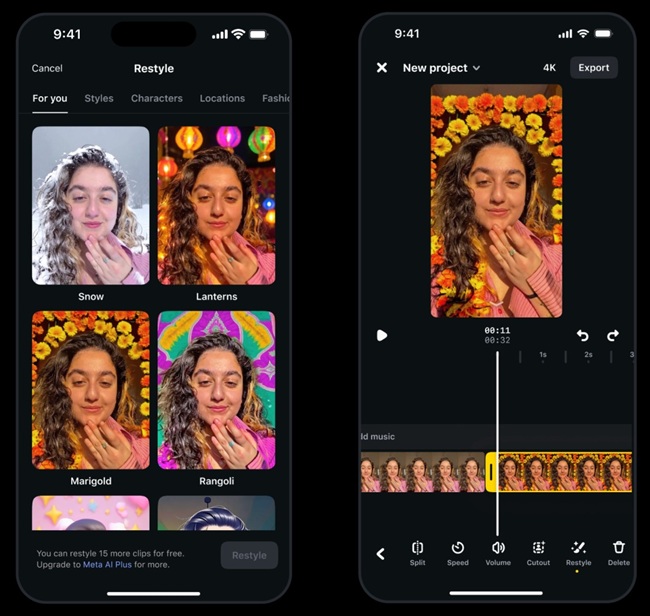
How to Use Restyle for Videos in Edits
- Open the Edits app and tap “+” in the Projects tab.
- Select a video from Reels, Camera, or Gallery.
- Tap the video in the timeline.
- Scroll the icons at the bottom and tap Restyle.
- Tap the Diwali header and select an effect: Lanterns, Marigold, or Rangoli.
- Export the video once edits are complete.
Diwali Restyle on Ray-Ban Meta Glasses
In addition, Meta has introduced Diwali-themed effects for Ray-Ban Meta glasses. Users can say “Hey Meta, Restyle This” to apply festive elements such as lights, fireworks, or rangoli patterns to their captures. The resulting images can be viewed in the Meta AI app, allowing users to enjoy Diwali-inspired visuals directly through their glasses.
Availability
The Diwali effects will be available until October 29, 2025, in India, the United States, Canada, Singapore, Australia, and several other countries.