
Home » Apple, Featured, Headlines, iPhone, News, Reviews, Software

Review: Sygic Mobile Maps India a Turn by Turn Navigation App for iPhone

on December 14, 2009 – 10:49 pm13 Comments

iPhone was never a perfect navigational device, though it has Maps App but it hardly solved the purpose, it just shows your current position and roughly calculates distance between point A and B. The scenario increased a little on iPhone world, with release iPhone OS 3.0 and biggies like TomTom, Sygic etc. launched there turn by turn navigational App for iPhone. But to hail the maps were only limited to US, Canada and Australia .After so much wait now we have a hope here, Sygic has launched a full blown turn by turn navigational App for iPhone with maps of India.
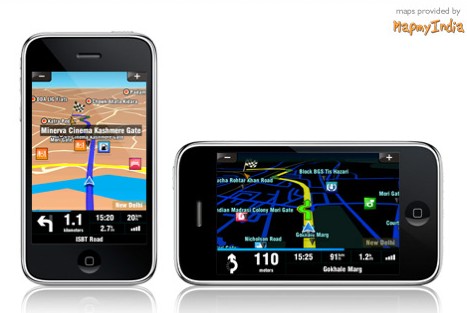
sygic-mobilemapsindia

Sygic and MapmyIndia, India’s leading map provider, have come together to launch ‘MapmyIndia Sygic Mobile Maps‘(iTunes Link). The application uses the MapmyIndia’s maps and Sygic software to offer the GPS navigation.

Look and feel:

The App looks just like any other navigational App, but the UI seems a bit complex.The bottoms are quite big, which is quite helpful to use the App while driving, It has option of using night mode and day mode, and the maps even has option of 2D and 3D view, which are quite basic for a navigational App. The worst part of the interface is the way of navigation, you cannot simply use the way we control our iPhone the simple flick, pinch to zoom, no it doesn’t works here. It seems like the UI is kind of straight rip off other touch screen phones, you need to use slider to zoom in or out, then there is directional keys to change the menu page etc. it is a really big set back for the App.

Clipboard01

Connectivity & Operation:

The App took nearly about 3-5 seconds to get a valid GPS signal and was ready for operation. The App works quite good on EDGE and routing took nearly few seconds, the maps were quite accurate and even many shortcut roads were listed. Though the map doesn’t show many details when it is routed, only the routed road is highlighted and shown. But the good part is that the street names that appear are quite readable compared to other Apps.

Clipboard01d

Features:

The App currently supports only 29 languages, excluding any Indian local language which is quite impressive but local language support would have been greater. The App has max speed warning and Sygic App also gives you the ability to navigate from options like select from Address, Favorite, History, POI, ZIP code, Home, Point on Map, enter GPS position, City enter, Last Valid Position. It also offers fastest, economic, shortest, pedestrian and bicycle route computations and option to avoid, don’t avoid toll roads or not. The itinerary part is quite useful and pretty good.

Negative Points:

  • The App eats the battery of iPhone like anything( problem with every GPS App).
  • Navigation freezes when the vehicle resumes after halt.
  • The map is not so much detailed.
  • Local language missing.
  • The interface is not built for iPhone.
  • The App doesn’t warns when a prescribed route is not followed.

Positive Points:

  • The App has lot of settings, customization is very easy and helpful.
  • Night view is quite good.
  • The size of App is way too small.
  • It has inbuilt Quick Guide, Memorize position etc.
  • It has extra apps like: World Clock, Calculator, Unit converter and Country info.
  • The App quickly calculates a Alternate route when the route suggested by App is not followed.

Asides:

Though it is the first turn by turn iPhone navigation App for India, it still needs some refinements.The 220 MB App needs more details and improvements. It costs about $79.99  which is kind of quite basic for a navigation App. Will I recommend it?? The answer is kind of mixed, either wait for TomTom to launch there Indian version or if you want now to experience some turn by turn navigation on iPhone then go for this, you will not be disappointed.

Related Posts with Thumbnails


  • Hemant Arya

    Good review. Just wanted to add that the maps are from MapmyIndia and not ‘Maps of India’. I have also been using the app for a couple of weeks now and have been impressed by its features. I was surprised when you wrote that the maps are not detailed. In fact the maps are very accurate and detailed. I have already used it to travel to Chandigarh and also within Delhi. The accuracy of the maps is something to be talked about.

    Also, the app will not warn you if a prescribed route is not followed – and will auto-calculate a new route for you – only when you select the ‘do not ask me to take a U-turn’ option. Even I found it a bit irritating initially but a quick look at the settings took care of the problem.

    :)

  • http://www.iamsamrat.com Samrat

    @Hemant For review we went to a non metro city, “Bhubaneswar” and tried out for few days out there.

    And thanks for the the second info.

  • http://www.sygic.com Anna

    Thanks very much for the review! Good news is, that we will be adding some local languages in the next update. I’d also like to check any inaccuracies that you’ve found or any details you’ve missed in the maps – we have a very good cooperation with MapmyIndia, and both us and they are appreciating any of your feedback. Battery consumption – as you’ve said, all nav apps are very demanding as they are computing constantly, so no wonder – we (all nav app providers) recommend keep the app charged all the time… and the charger/holder also takes care for safe usage of the device while driving, having it in good viewing angle. Any questions are welcome! Anna, Sygic – we listen.

  • bsd

    Dear Everyone,Thanks for your comments on Sygic India app for iPhone. I bought the app a few days back and I must say I am not disappointed. There are some things which I would like to see before I can term this as awesome.

    1. The app does not have an Internet interface. How do I get latest updates of the app and map? How does the app update itself periodically?

    2. The app does not have an option to “remember” the route taken by me (based on my experience of a local city). This option would greatly enable people using the app to share the best routes. There is no option to save route taken by me and import/export the same.

    3. Google Integration: Can not import Google Maps directions…(assuming Google Maps can export something).

    Some comments against the cons posted by the author:
    * The App eats the battery of iPhone like anything( problem with every GPS App). – Buy a car charger.
    * Navigation freezes when the vehicle resumes after halt – I never experienced this. The GPS lock without a SIM car never exceeded 5-10 seconds.
    * The map is not so much detailed – The map is well detailed, though some roads are missing. Not quite sure how Sygic plans to address the map updates.
    * Local language missing – Good. Some things in world should be standardized. English suits well for anyone who buys an iPhone and this app in India.
    * The interface is not built for iPhone. – Once again – This is not a bad. While driving, I would want to use one finger to ZOOM, not use iPhone pinching for zooming.
    * The App doesn’t warns when a prescribed route is not followed – Agree. It auto-recalculates the route after sometime. I have never understood the algorithm behind this. Sometimes it does it frequently and sometimes it takes a lot of time. I end up cancelling the current route and following a new route.

    All in all, its a novel experience here using iPhone as a GPS unit. Does justice to its reputation as a convergence device. THanks to Sygic and MapMyIndia for a great application with greater potential.

  • Abhi

    Hi,

    I have ordered the same, and would be expecting in few days. Would comment upon the same once in hand….

    The query here is are the maps upgradable… without an extra charge frm MapmyIndia….?

  • bsd

    This app can be downnloaded from itunes. What do you mean by you have ordered for the same and expecting in a few days?

  • brs

    does mobile maps for india work on iphone 2g iOS 3.1.3?

  • bsd

    iphone 2G does not have a GPS chip and mobile maps will not work. You can buy a GPS cradle so that it sends GPS info to your phone and to mobile maps. Otherwise you can buy a bluetooh GPS unit and jailbreak iPhone to install xGPS.

  • sahil

    but how we get valid signal

  • jeetendra r chawda

    does map my india navigation for iphone3gs can work without sim card or iphone requires internet activated sim card kindly help?

  • jeetendra r chawda

    can map my india navigation works without sim card or it requires active internet sim card please help?

  • bsd

    mapmyindia works without SIM card. They are onboard maps. It works perfectly on iPhone 3g and above without SIM card. Set location services to ON before loading the app.

  • http://www.sygic.com Anna

    thanks for explanation, bsd. Glad to hear that you are happy and helping out other customers with your advice.