

OpenAI has introduced dots, a new type of AI agent that can work on tasks and projects on behalf of users. The company says dots can continue working on projects without requiring users to direct every step.
Dots can work on their own
Dots have their own cloud computer and browser and can use connected apps to work on tasks. Through OpenAI’s plugin ecosystem, they can connect to more than 4,000 apps. Powered by GPT-6 Astra, dots can work toward user-defined goals 24/7 and learn from feedback over time, including users’ preferences and working standards.
Users can start with a primary dot, give it a name, and customize it. A dot can also work on several projects at the same time, while users can continue giving it new tasks and ideas without managing separate threads or directing every step.
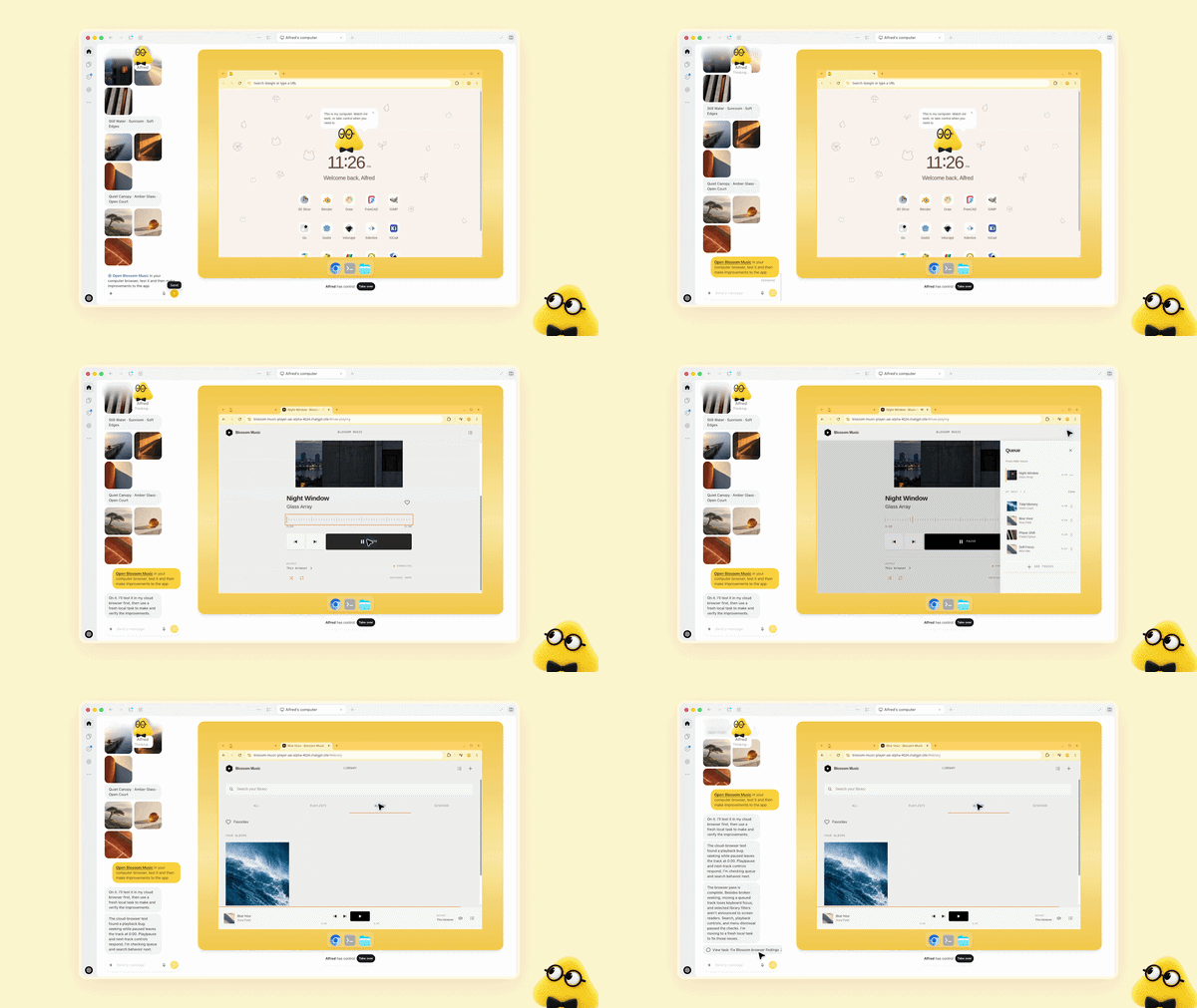
Users can open a dot’s computer at any time to inspect its work. Dots can also connect to other devices, including a user’s laptop, when permission is provided.
Dots can handle different types of ongoing work, including:
- Software development: Monitor customer feedback, scope smaller improvements and bug fixes, build and test them, and prepare pull requests with videos for review.
- Product launches: Learn the audience, positioning, and creative standards, then revise launch materials when the product scope changes.
- Scientific research: Rerun analyses as new data arrives, investigate unexpected results, update figures, and flag areas that need review.
- Enterprise sales: Check customer requirements against product documentation, build a proof of concept for a key integration, and update proposals and test plans as requirements change.
- Content production: Identify clip moments from interview transcripts, prepare show notes, draft social posts, and carry approved edits across related materials.
OpenAI also gives examples from its own work. When a bug appears in Slack, a dot can investigate it. When a new design arrives, a dot can turn it into a working app while the team focuses on customer feedback. During a planning cycle, dots can help keep work moving toward a deadline.
In another example, an early tester’s dot noticed that the tester had forgotten to invoice a publication, prepared the invoice, and sent it after receiving approval.
Dots work across ChatGPT, Slack and Teams
Users can message or call dots through ChatGPT on desktop, web, and mobile. They can ask questions, explore ideas, provide feedback, or use a voice call. Dots can also send progress updates, questions, or decisions that require user input.
Dots can also be accessed through Slack and Teams. Users can start a project in ChatGPT, share context with a team in Slack, and have the dot continue the work. OpenAI says dots carry context across these channels. Texting support is planned for a later date.
Safety and permissions
Dots build on ChatGPT’s existing protections with additional safety and privacy safeguards. Each dot operates on its own cloud computer, while the user’s computer and its contents remain separate unless the user chooses to connect them. For supported websites, dots can use saved passwords without exposing them to the model.
Dots can also perform background work called “proactive research” when users are not actively working with them. This uses connected apps with read-only tools, which cannot send messages, change app content, or control the user’s browser or computer.
Users can control how dots work through:
- App access: Choose which connected apps a dot can access.
- Custom Rules: Allow specific actions, require approval, or block actions.
- Activity View: Follow progress and redirect a dot when necessary.
- Security monitoring: Detect potentially harmful behavior and pause or stop the dot if a safety concern is identified.
- Auto-review: Check actions that could affect accounts or share information against user instructions and safety requirements.
- Sensitive actions: Tasks such as changing a password remain with the user.
OpenAI says it does not use content from ChatGPT Business, Enterprise, or Edu workspaces to improve its models by default. On personal ChatGPT plans, users can control whether dot conversations and work are used to improve models. OpenAI also says it does not train directly on proactive research or a dot’s notes to itself, although information from them may be used if it informs an eligible conversation or task, depending on settings.
OpenAI notes that dots can still make mistakes and recommends reviewing consequential work.
Specialist dots for organizations
OpenAI is also previewing specialist dots for dedicated, well-defined responsibilities within organizations. Companies can give each specialist dot its own identity, credentials, and access to required systems.
Specialist dots can include:
- Access management
- IT-provisioned hardware
- Integrations with company systems of record
- Defined organizational responsibilities
OpenAI says it is testing specialist dots across procurement, invoice processing, email marketing, customer support, and commercial contracting. The company is starting with focused enterprise pilots, with engineering teams working with organizations to define each dot’s responsibilities, tools, and review and approval process.
OpenAI is also working with Microsoft to integrate specialist dots with Microsoft Agent 365 and its enterprise governance and security controls.
Availability and pricing
OpenAI is rolling out dots in eligible markets, with availability varying by plan:
- Pro: Dots are rolling out to users in eligible markets.
- Business Premium: Dots are rolling out to users in eligible markets.
- Enterprise: Users, including Edu and Healthcare workspaces, can try the beta when their workspace administrator enables it.
For Pro and Business Premium users, the first dot is included at no additional cost. The plans also include an allowance for deeper work, with extended limits during the first month after launch.
Usage works as follows:
- Conversations with a dot do not count toward ChatGPT usage limits.
- Tasks that a dot starts or manages in Codex or ChatGPT Work count toward usage limits as usual.
- OpenAI plans to let users add more dots in the future.
- Users will be able to scale a dot’s output by increasing its speed or the total amount of work it handles per month.
To get started, users can create their first dot through the ChatGPT desktop app or desktop browser and connect the apps they want it to use. After completing the initial setup, they can also message the dot through the ChatGPT mobile app.