
Instagram has introduced First Draft, a new feature that creates an initial Reel edit within the Instagram app. Users can select one or more clips and tap the First Draft button to trim down the clips and remove pauses and silences, creating a starting edit within seconds.
First Draft supports different types of Reel content, including:
- Multi-clip montages
- Talking-head videos
- Day-in-the-life content
For talking videos, First Draft detects pauses and silences and trims them from the footage.
All changes made by First Draft are reversible. Users can reorder, remove, or adjust clips, or start over before continuing to Instagram’s full Reel editor. After reviewing the edit, users can proceed to the full editor or publish the Reel.
First Draft is integrated into Instagram’s Reels creation flow, allowing users to select, edit, and share their content without leaving the Instagram app.
How to access First Draft
There are two ways to use the feature:
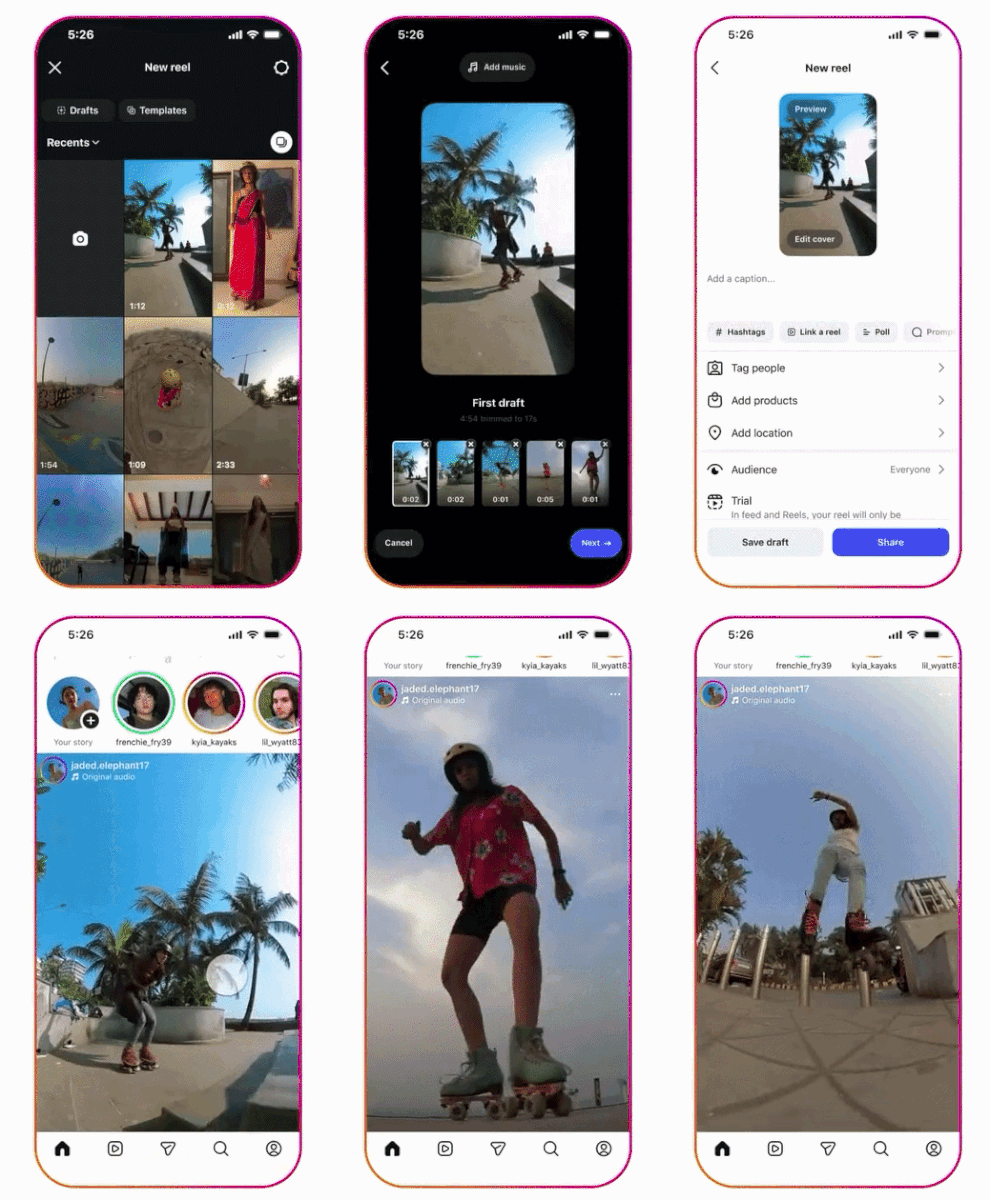
- Using existing clips: Open the Reels gallery, select one or more clips, tap the First Draft button at the bottom of the screen, review the edit, and then proceed to the full editor or publish it.
- Using newly recorded content: Open the Instagram camera, record your content, tap the First Draft button, review the edit, and then proceed to the full editor to publish it.
Availability
Instagram First Draft is currently available only on iOS.